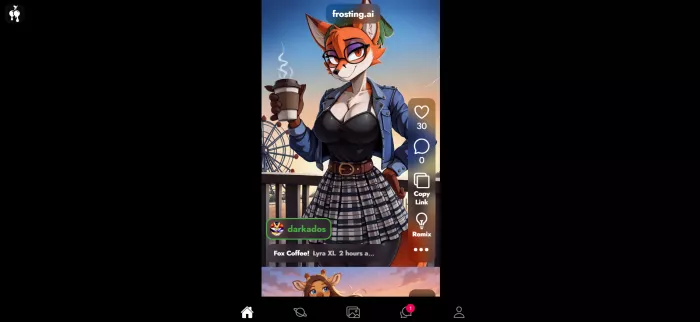
100 free image credits. Every single day. No credit card. No watermark.
That's the promise that made me sign up for Frosting AI. In a market where most "free" AI art tools give you ten images and then push a paywall in your face, that offer sounded too generous to be real. So I spent a week using it — free tier first, then digging into the paid plans — to find out what the catch is.
Frosting AI is a browser-based AI image generator built on Stable Diffusion. You type a text prompt, pick a model and a style, and it creates an image in about 10 to 30 seconds. Nothing to install, no Discord needed — it runs straight in your browser, and there's an Android option too.
Under the hood, it gives you a library of Stable Diffusion models (like Dreamshaper XL) covering anime, realistic, fantasy, and abstract styles. On top of that, it adds tools that free generators usually don't have: negative prompts, reference images, ControlNet, LoRA support, inpainting, batch generation, and upscaling. There's also a video generator and a character chat feature called Dreamchat, though both still feel like beta features.
From my testing, Frosting AI fits best for:
It's a poor fit if you need Midjourney-level realism, readable text inside images, or perfect hands and faces. Those are classic Stable Diffusion weaknesses, and Frosting has all of them.
Here's the exact process, from empty page to finished image.
Open frosting.ai and sign up. It's free, and no card is asked for. You get 100 credits, refreshed daily.
Write your prompt. Describe the image: subject, style, colors, lighting. Detail helps. "A cozy coffee shop in the rain, warm light, anime style" beats "coffee shop."
Add a negative prompt. This is where you list what you don't want — "blurry, extra fingers, low quality, text." In my testing, this one step improved results more than anything else.
Pick your settings.
Choose a model from the library, an aspect ratio (square, portrait, landscape), and prompt strength. Paid plans unlock extras like reference image uploads and bigger batches.
Generate. Wait 10–30 seconds. Each image costs credits — the amount depends on resolution and quality steps.
Refine or upscale.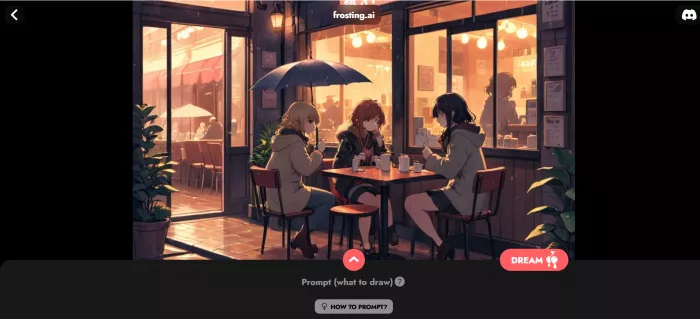
Don't like it? Tweak the prompt and go again. Like it? Upscale it for a sharper final version and download. No watermark, even on free.
Now, an honest note before the numbers. Frosting's official website is built entirely in JavaScript, so it doesn't show a public price list to search engines or page scrapers — the plans appear inside the app. The figures below are the ones consistently reported across independent 2026 reviews like ToolJunction and ToolsForHumans, and they match each other. Still, open the pricing page in your own account before paying, because Frosting has changed its prices at least once before.
| Plan | Price | Daily credits | Best for |
| Free | $0 | 100 | Testing and casual use |
| Planet | $7/month | 500 | Regular creators, blog visuals |
| Star | $25/month | 1,500 | Content creators, batch work |
| Nebula | $55/month | 4,000 | Heavy users; adds video generation |
| Galaxy | $120/month | 10,000 | Agencies; priority processing |
Extra facts reported consistently:
Power features worth learning:
Compared to bigger tools, public feedback on Frosting is thin — no giant Trustpilot pile, no huge subreddit. But the reviews that exist agree on a clear pattern.
The praise: the free tier is genuinely usable, the interface is clean, and features like ControlNet and reference images "rival self-hosted Stable Diffusion," as Plisio's 2026 review put it. Generation is fast, usually under half a minute.
The complaints: image quality sits at mid-tier SDXL level — fine for social posts, not for print work. Hands, faces in crowds, and any text inside images come out messy. Users also report server lag during peak hours and occasional slow refunds when a charge fails. The video generator and Dreamchat feel unfinished.
The reassuring part: no review cluster points to scams or shady billing traps. After reviewing tools where the billing section needed its own warning label, that's worth saying out loud.
Pros:
Cons:
No tool fits everyone, so here are the alternatives I'd actually consider, based on my own testing and cross-checked 2026 reviews.
| Tool | Free tier | Paid starts at | Strongest point | Biggest weakness |
| Frosting AI | 100 credits/day, no card, no watermark | $7/month | Pro controls (ControlNet, inpainting) for cheap | Mid-tier quality ceiling |
| Midjourney | None | $10/month (~200 images) | Best image quality | No free tier, fewer controls |
| Leonardo AI | 150 tokens/day (public outputs) | $12/month (8,500 tokens) | Character consistency, pro toolkit | Tokens drain fast on premium models |
| SeaArt AI | ~21 images/day | Shown in-app by region | Huge volume + video models | 1.9 Trustpilot, billing complaints |
| Civitai | Free model downloads | Pay-as-you-go credits | Biggest open model library | Technical learning curve |
| Krea AI | Yes, limited | Check current site | Real-time generation | Pricing has shifted; verify first |
I came in looking for the catch behind "100 free credits a day," and here's what I found: the catch is the quality ceiling, not the pricing. Frosting AI is honest about what it charges, generous with what it gives away, and clearly aimed at people who want real creative controls without renting a GPU or learning ComfyUI.
For my own work — blog images, quick concept art, social visuals — the free tier honestly covered most days, and $7/month is an easy yes if I need more. For client-facing, print-quality work, I'd still reach for a premium tool.
Would I recommend it? Yes, with two eyes open: know that it's an 18+ platform by design, and don't expect Midjourney polish. But as a free playground for learning AI art properly — negative prompts, ControlNet, inpainting, all of it — I haven't found a more generous starting point.
And that's the strange thing about Frosting AI: the tools everyone warns you about charge like saints, and this one, which gives half its product away, barely gets talked about at all. Maybe generosity just doesn't trend.
a place where users could create interactive characters, explore long...
A detailed Luminarbrush.ai review based on real usage, exploring its l...

Dopple AI is not trying to be a productivity tool or a general assista...

An AI system that trades across multiple markets and generates passive...

designed specifically for hospitals, clinics, and healthcare networks...

Akool is one of the few platforms that actually bridges that gap, and...

Discussion