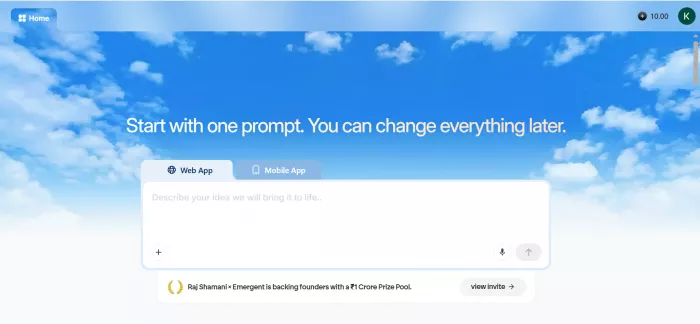
Emergent AI app builder dashboard showing a natural-language prompt being turned into an app
I’ve lost count of the “build an app just by typing” tools I’ve tried, and most of them fall apart the moment you ask for something real. So when Emergent AI kept showing up in my feed, usually with someone claiming they shipped a working SaaS in an afternoon, I went in skeptical. I wanted to know two things: does it build production-ready software from a sentence, and what does it cost once the free credits run out?
This review walks through exactly how Emergent works under the hood, the real 2026 pricing pulled straight from their official site, what hundreds of real users are saying (the good and the ugly), and who I think should and shouldn’t open their wallet for it.
Quick note on the name first, since it confuses people. In AI research, “emergent” means skills that appear in big models as they scale. That’s not this. This article is about Emergent, the app builder at emergent.sh from Emergent Labs. You describe what you want in plain English, and it handles the coding, design, backend, and hosting. No setup code, no servers to manage.
It’s made for people who can’t (or don’t want to) code, like founders, product managers, ops teams, and small agencies, though developers use it to skip the boring setup too. A few things worth knowing: it builds full web and mobile apps for iPhone and Android, well beyond landing pages; the code is yours to push to GitHub and take anywhere; and it’s no weekend project, having raised a $70M Series B at around a $300M valuation in January 2026, with millions of apps built on it. It runs on top models like Claude Opus 4.8 and Claude Fable 5, which you pick right in the chat box.
How Emergent AI Works (The Complete Walkthrough)
Most reviews skip this part, so let me show you what actually happened when I used it. The first thing to know is that Emergent isn’t one chatbot writing code. It’s a team of AI agents, each taking a piece the way a real dev team would: one plans, one designs, one codes, one wires up the connections, and one keeps it on track. So nothing is left to a single model guessing at everything; each part is built to fit the rest.
To really test it, I built a small booking app, the kind a local business might use to take appointments. Here’s how it went, step by step.
I signed up at app.emergent.sh with my Google account (email and GitHub work too) and was inside the builder in seconds. It’s a clean, dark screen, nothing fancy, with no long tutorial or setup pages. I just hit “Start Building.”
Then I described the idea in plain words, something like: “a booking app where customers pick a service, choose a time slot, and pay a deposit, plus an admin view so the owner can see the day’s appointments.” I kept it specific on purpose, because the more detail I gave here, the better the first build came out. That opening message really does most of the work.
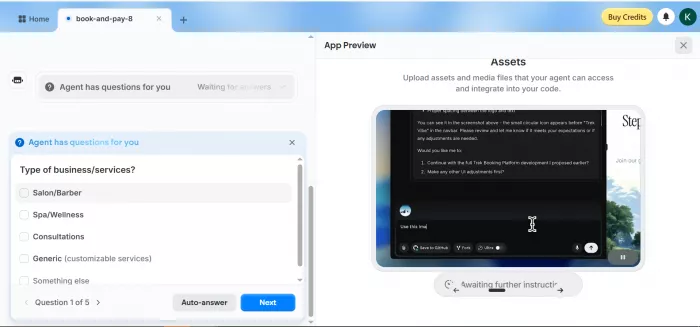
This is the bit that won me over. Instead of immediately spitting out code, Emergent repeated my idea back to me to check it understood, then asked a few smart questions first. For my booking app, it asked things like:
Login: Emergent’s Google login, my own, or a simple username and password?
AI features: suggestions, a chatbot, analytics, or none?
Calendar: connect a real one, or fake it for the demo?
Payments: set up Stripe in test mode?
I picked Emergent’s Google login, skipped AI features for now, faked the calendar for the demo, and set up Stripe in test mode. It felt less like a template generator and more like a developer asking what I actually needed. It built around my answers instead of guessing.
Once I answered, it got to work and showed me every step: creating the front-end and back-end files, installing what it needed, restarting things, even reading its own error logs when something tripped up. I wasn’t staring at a spinner wondering what was happening; it felt like watching a coder work beside me. And what came out was a real, full app, not a hollow shell: the screens customers would see, the back-end logic and APIs, a real database, logins and user roles, plus the hosting to tie it all together. A few minutes in, I had a booking flow I could actually click through.
Step 5: Preview, test, and tweak by chatting
ll beI got a live preview and started tweaking it just by asking, like “put the calendar front and center” or “send a confirmation email after payment.” Each change ran back through the agents. This is also where I watched my credits start ticking down, and I’ honest about that below, because one small styling change got stuck in a loop and cost me more than it should have.
When I needed real tools, I just asked. Emergent wired up Stripe for payments, and it also connects to GitHub, Supabase, CRMs, and other apps through their APIs, plus MCP (a way to plug in more AI tools). I used my own Stripe test keys, with no limit on what I could add.
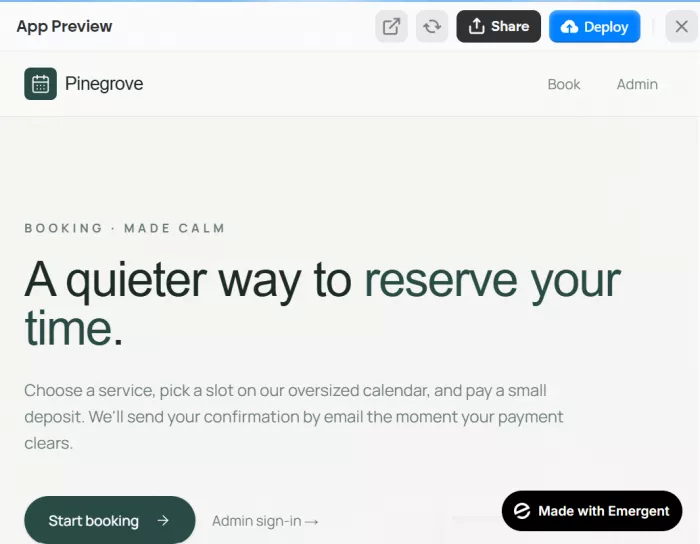
When I was happy with it, going live took basically one click; the hosting, database, and APIs were already set up. The part I really liked: the code was mine. It synced to my GitHub, so I could open it in VS Code, edit it by hand, or move the whole thing to AWS, Vercel, or DigitalOcean later. No lock-in, which is rare here and a big reason developers tolerate the credit system.
Here’s what everyone really wants to know. Emergent doesn’t charge a flat monthly fee. Instead, you pay with credits, and every action the AI takes uses some up.
| Plan | Price shown in screenshot | Credits | Best for | Important note |
| 3-day Standard Pass | ₹99 / 3 days | 100 credits | Testing Standard before monthly billing | Renews after 3 days at ₹1,649/month |
| Standard | ₹1,649/month | 100 credits/month + 150 bonus credits for first month | First-time builders | Screenshot shows 250 credits in first month if bonus applies |
| Pro | ₹13,849/month | 750 credits/month | Serious creators and brands | Screenshot shows ₹14,999 crossed out and ₹1,150 saving |
| Enterprise | Custom | Custom | Large teams/organizations | Public official page lists |
I read through a pile of reviews on Trustpilot, G2, and other sites, and the honest takeaway is that opinions are split. Here’s how it breaks down.
The ratings tell the story. On Trustpilot, Emergent sits around 2.7 out of 5, with roughly half the reviews at one star. Smaller, hand-picked review sets look far rosier; one batch of 15 reviews averaged about 4.1 out of 5. That gap is the real headline.
What people love:
What frustrates them:
The takeaway: your experience depends a lot on what you expect, how well you write prompts, and how complex your app is.
The good:
The not-so-good:
If you do try it, here are a few habits that’ll save you money:
Emergent isn’t the only tool like this in 2026. Before you commit, it’s worth a quick look at a few others:
Lovable and Bolt: quick web-app building at a similar price, and usually faster to tweak.
Base44: simpler and better for beginners, with fewer advanced settings.
Databutton: more of a back-and-forth chat with an AI developer, if that’s your style.
The short version: Emergent is the deeper, more powerful option that gives you full apps and full ownership. The others lean toward speed and simplicity. Pick based on whether you care more about control or convenience.
So, after all of that, where do I land? Emergent is one of the best AI app builders I’ve used. It actually does what it says. You describe an app, watch a team of AI agents build the whole thing in front of you, push it live in a click, and walk away owning the code. If you’re a non-coder who’d otherwise pay an agency thousands and wait months, that’s not hype. That’s a real change in what you can do on your own.
But I’d be doing you wrong if I stopped there. The credits are the catch, and it’s a real one. The same flexibility that lets it build anything also makes the cost hard to predict, bug-fixing loops can hurt, and your results really come down to how well you prompt. The mixed reviews aren’t random. This is a tool that rewards planning and punishes winging it.
So here’s my honest advice. If you’re a builder, a product manager, a solo founder, or a small agency, and you’re willing to spend a little time learning to prompt well, start on the free plan to get a feel for it, then move to Standard for your first real build. Just go in knowing that some credits will go toward learning the tool, not only shipping with it. If you need rock-solid, predictable costs, or you’re building something where a runaway bug loop would be a disaster, either skip it or test it on a small, throwaway project first.

a place where users could create interactive characters, explore long...

A detailed Luminarbrush.ai review based on real usage, exploring its l...

Dopple AI is not trying to be a productivity tool or a general assista...

An AI system that trades across multiple markets and generates passive...

designed specifically for hospitals, clinics, and healthcare networks...

Akool is one of the few platforms that actually bridges that gap, and...

Discussion