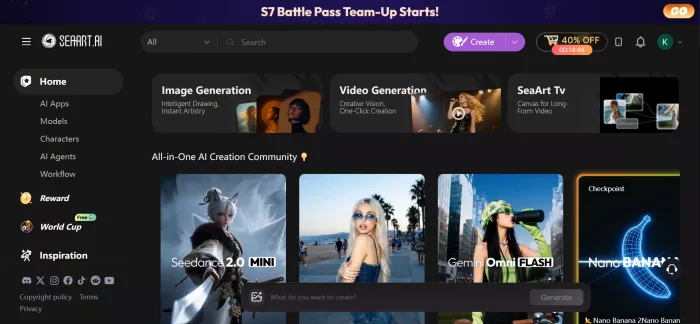
Here's a number that stopped me: SeaArt AI says it has over 50 million registered users. And here's another one: its Trustpilot rating is just 1.9 out of 5.
How can one tool be this popular and this disliked at the same time? That question is the reason I signed up, used it for two weeks, and wrote this review. By the end, you'll know exactly what SeaArt is, how it works step by step, what it really costs, and whether it's worth your money.
SeaArt AI is an online platform where you can create AI images, AI videos, and even chat with AI characters — all in one place. You don't need to install anything. It runs in your browser and also has apps for iOS and Android.
What makes it different from tools like Midjourney is choice. SeaArt doesn't lock you into one AI model. As of July 2026, it gives you access to many top models under a single account:
For video: Veo 3, Sora 2, Kling 2.6, Wan 2.6, Seedance 1.5 Pro, Hailuo, Vidu
For images: Flux, Nano Banana Pro, Seedream, Qwen, plus thousands of Stable Diffusion models
From the community: hundreds of thousands of user-made models and LoRAs, with anime styles being the biggest strength
The company behind it is based in Singapore, and SeaArt was even featured in the well-known a16z Top 100 Gen AI Apps list. So this is not a small or unknown tool.
In my testing, SeaArt worked best for:
This is the part most reviews skip, so let me walk you through the exact process I followed.
Sign up for free. No credit card needed. You get free daily "Stamina" — SeaArt's daily-use points. According to the official FAQ, the free allowance covers about 21 basic images per day.
Pick a model.
You can browse the model library, or find an image you like in the community feed and hit "Remix." Remixing copies that creator's prompt, model, and settings — the fastest way to learn.
Write your prompt. Describe what you want. Then add a negative prompt — things you don't want, like "blurry, extra fingers, text." This one habit improved my results more than anything else.
Hit Generate.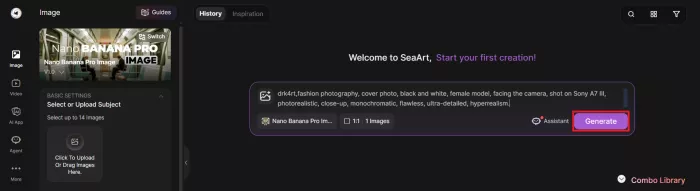 A standard image uses about 6 Credits' worth of Stamina. It takes under a minute.
Upscale and download. One click makes the image sharper. Free downloads have a watermark; paid plans remove it.
Either type a text prompt or upload an image you want to animate.
Choose a model (Kling, Wan, Seedance, and others sit in one dropdown — this is SeaArt's best feature).
Generate. One video costs between 30 and 90 Credits depending on the model and length.
This sounds advanced, but it isn't. Upload 20–30 pictures of a character or style, wait for training to finish, and SeaArt creates a small custom model that draws that character again and again. A typical training run costs 50–200 Credits. This is why manga creators and small brands love the platform — consistent characters without hiring an artist.
SeaArt offers a free plan plus four paid tiers, called SVIP plans. Here is what each one gives you, exactly as listed in the official FAQ:
| Plan | Daily Stamina | Images per day (approx.) | Tasks you can queue / run at once |
| Free | Daily free allowance | 21 | 2 / 1 |
| Beginner SVIP | 300 | 50 | 5 / 3 |
| Standard SVIP | 700 | 116 | 5 / 3 |
| Professional SVIP | 2,100 | 350 | 10 / 5 |
| Master SVIP | 3,500 | 583 | 10 / 5 |
A few more facts, all from the official page:
I read through Trustpilot, Reddit, and several independent reviews, and the feedback splits cleanly into two camps.
The happy users praise the huge model library, the anime quality, and the generous free tier. One reviewer on Cybernews found it especially strong for fantasy art and character design.
The angry users almost all talk about one thing: billing. On Trustpilot, multiple people describe the 3-day free trial converting into a full yearly charge — one user reported being billed $251.88 — with refund requests denied. SeaArt's own FAQ even admits the trial charge "may be processed a few hours earlier" than expected, and recommends cancelling at least one day in advance.
There's also frustration about content rules. After SeaArt tightened its moderation in late 2025, one Reddit user called the change "killer for my workflow."
I expected SeaArt to be either a hidden gem or a trap, and it turned out to be both. As a creative tool, it earned a permanent place in my routine — nothing else lets me test Kling, Wan, and Seedance side by side this cheaply, and for anime-style work it's simply the best value I've found. As a subscription, it demands caution: virtual card, calendar reminder, screenshots.
Would I recommend it? Yes — to anyone willing to spend five minutes protecting themselves before spending a single rupee or dollar. The tool is better than its reputation. The billing system is exactly as bad as its reputation.
And that leaves me with the question I started with: how long can a tool this good afford to make its own customers this nervous?
a place where users could create interactive characters, explore long...
A detailed Luminarbrush.ai review based on real usage, exploring its l...

Dopple AI is not trying to be a productivity tool or a general assista...

An AI system that trades across multiple markets and generates passive...

designed specifically for hospitals, clinics, and healthcare networks...

Akool is one of the few platforms that actually bridges that gap, and...

Discussion