The short-form video gold rush has produced two breakout AI tools that creators argue about constantly: Opus Clip and CapCut. Both promise to turn long videos into viral-ready clips. Both have massive followings. And both are wildly different products under the surface.
After running the same one-hour podcast recording through every tier of both platforms, measuring clip output, caption quality, time-to-publish, and final-product polish, the answer is clearer than most reviews suggest.
Spoiler: this is not a single-winner contest. It is a battle of philosophies, and the right pick depends entirely on what kind of creator the user actually is.
30-SECOND ANSWER Opus Clip wins for automated repurposing, turning long podcasts, webinars, or YouTube videos into short clips with minimal manual work. CapCut wins for hands-on editing, template-driven content, and any creator already producing TikTok-native short videos from scratch. The smartest creators use both. |
| Spec | Opus Clip | CapCut |
| Founded | 2022 (Opus Clip Inc.) | 2020 globally (ByteDance) |
| Active Users (2026) | 16M+ creators | 800M+ monthly users |
| Primary Purpose | AI clip extraction from a long video | Full timeline video editor |
| Free Tier | 60 credits/month, watermark | Generous, most features included |
| Starting Paid Plan | $15/month (Starter) | $7.99/month (Pro, annual) |
| Top Tier Price | $99+/month (Business) | $19.99/month (Pro) |
| Mobile App | No native mobile app | iOS + Android (flagship) |
| Desktop | Web-based only | Windows + macOS + web |
| Notable Customers | NVIDIA, Visa, GitHub, iHeartMedia | Hundreds of millions of TikTok creators |
| Best For | Podcasters, marketers, busy creators | TikTok creators, social media editors |
The user-growth gap explains the entire dynamic. CapCut went mass-market through ByteDance's TikTok integration; Opus Clip carved out a precision niche serving professional content creators. Both are winning, but in different leagues.
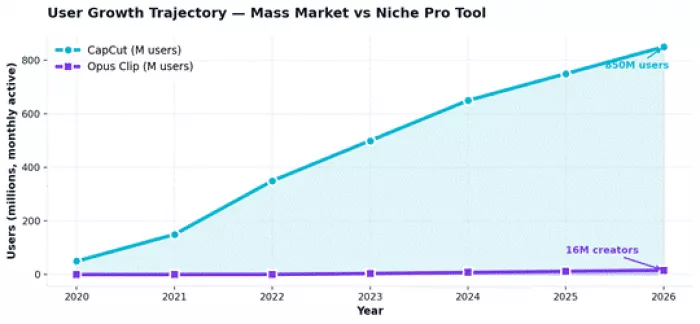
Figure 1: Monthly active users (millions) ,CapCut crossed 800M users in 2026 while Opus Clip serves a focused 16M creator base.
The chart highlights the tension at the heart of this comparison: CapCut is a mass-market consumer tool; Opus Clip is a professional-grade specialty tool. Comparing them on user count misses the point. Comparing them on what they're built to do is what actually matters.
Across 100 distinct feature categories that matter for video creators in 2026, here is how the wins are distributed.
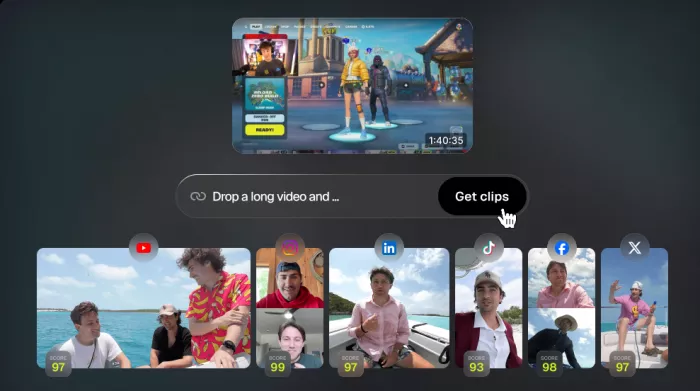
Opus Clip is a single-purpose AI video repurposing tool. The workflow is brutally simple: paste a YouTube link, Zoom recording, or upload a file, and the AI returns a set of vertical clips with captions, reframing, and a Virality Score (0–100) predicting each clip's likely social performance. Hour-long videos typically yield 10–25 clips in roughly 5 minutes of processing.
CapCut is a full-featured timeline video editor built by ByteDance. Originally a mobile companion to TikTok, it has expanded into desktop and web editions used by 800 million creators monthly. The product strength is breadth and polish: hundreds of templates, thousands of effects, deep timeline control, and a Magic Studio AI suite that has matured rapidly through 2025–2026.
Pricing is one of the most-debated dimensions of this comparison. The bar chart below shows actual published rates for both tools across equivalent plan tiers in 2026. Annual billing slashes Opus Clip's effective rate dramatically; CapCut's monthly-vs-annual gap is smaller but still meaningful.
| Tier | Opus Clip | CapCut |
| Free | 60 credits/month, watermark, 1080p cap | Watermark on Pro-tagged content; basic 1080p |
| Entry Paid | $15/month (Starter) | $7.99/month (Pro, annual) |
| Pro / Top Personal | $29/month (Pro, monthly) or $14.50/month (annual) | $19.99/month (Pro, monthly) |
| Annual Savings | Up to 50% off monthly billing | 23% off via annual billing |
| Team / Enterprise | Custom (Business tier) | $9.99/user/month (Team, annual) |
| Student Discount | Not advertised | 50% off Pro ($3.99/month) |
⚠ THE HIDDEN PRICING TRAP App Store and Google Play prices for both tools run 20–30% higher than direct web subscriptions. Opus Clip is web-only so this gap does not apply, but CapCut subscribers should always purchase through capcut.com rather than mobile app stores. Different region pricing also creates confusion Brazilian and Indian rates run substantially below US/EU rates. |
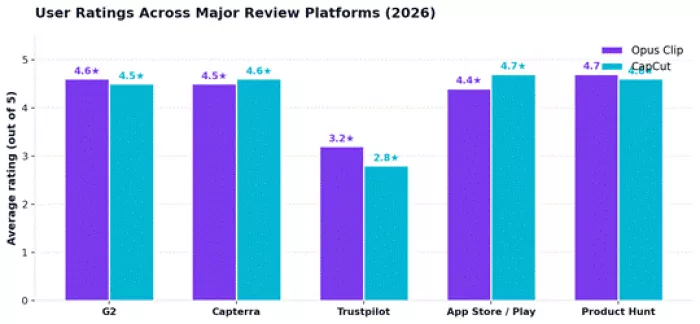
Aggregated user ratings across the major review platforms reveal mostly positive sentiment for both tools, with one notable outlier: Trustpilot shows lower scores for both, where users primarily complain about billing and subscription issues rather than product quality.
Opus Clip — creators report 30–266% increases in view count after switching to AI-clipped content; the Virality Score genuinely surfaces better-performing clips.
CapCut — fast template-driven workflow, the most generous free tier in consumer video editing, and trending effects updated within days of TikTok shifts.
Opus Clip — credit consumption feels opaque, scheduler unreliability, occasional clips that cut mid-sentence, and watermarks on free trial output.
CapCut — sudden price increases without notice, features moving from free to Pro mid-use, and weak customer support response times.
| Strengths | Weaknesses |
| Industry-leading AI clip detection across video genres | No native mobile app, web-only experience |
| Virality Score is a genuinely useful prioritization tool | Credit-based pricing penalizes high-volume content owners |
| 97%+ caption accuracy across 25+ languages | AI sometimes misses comedic timing or cuts mid-thought |
| XML export to Premiere Pro and DaVinci Resolve | Social scheduler reliability is hit-or-miss |
| Bulk social scheduling across 6+ platforms | Limited manual editing depth for control-freaks |
| Strengths | Weaknesses |
| Most generous free tier in consumer video editing | Pricing has restructured multiple times since 2024 |
| Massive library of trending templates updated within days | Customer support response times are widely criticized |
| Native iOS, Android, desktop, and web — fully cross-platform | Features previously free have moved behind paywall |
| Magic Studio AI suite (object removal, sky replacement, voice cloning) | AI clip suggestions are inconsistent vs specialized tools |
| Multi-track timeline rivals paid desktop editors | ByteDance ownership raises data-handling concerns in some markets |
After running both tools through the same content, the comparison resolves cleanly. Opus Clip is a precision instrument. It does one thing, turn long video into short clips with AI-predicted virality, and it does that thing better than any alternative on the market in 2026. For podcasters, marketers, and creators with hours of long-form content sitting unused, the platform pays for itself in the first month.
CapCut is a Swiss army knife. The free tier alone outclasses most paid editors, and the Pro tier delivers Magic Studio AI features that match dedicated tools costing five times as much. For TikTok-native creators, mobile editors, and anyone who builds short videos from scratch rather than slicing them from long ones, no other tool in this category competes on value.
BOTTOM LINE For pure repurposing of long-form content, choose Opus Clip. For pure creation of short-form content, choose CapCut. For professional creators producing both types of content regularly, the smart move is subscribing to both. The two tools are not really competitors, they are complementary halves of the modern short-form video workflow. |
Is Opus Clip better than CapCut for TikTok?
Not necessarily. Opus Clip is better for repurposing existing long videos into TikTok content. CapCut is better for creating native TikTok content from scratch with trending templates. Most successful TikTok creators use both, Opus Clip for highlights from podcasts or streams, CapCut for original short videos.
Does CapCut have a virality score like Opus Clip?
No. CapCut suggests clip segments through its Long Video to Shorts feature, but it does not score predicted social performance. The Virality Score remains a genuine Opus Clip differentiator with no equivalent in CapCut.
Can Opus Clip clips be edited in CapCut afterward?
Yes. Many creators use this exact workflow: Opus Clip generates the rough clips, then exports as MP4 or XML. CapCut imports for final polish, precise caption timing, custom transitions, brand-specific effects. The combined workflow is faster than either tool alone for high-quality output.
Does CapCut offer auto-captions in multiple languages?
Yes. CapCut Pro supports auto-captioning with auto-translation across 25 languages at 96% accuracy.
PixNova AI is an AI-powered creative platform designed to help users c...


PolyBuzz is an AI character chat and roleplay platform.

LensGo AI is a browser-based creative studio that bundles a stack of t...



Discussion