I'll be upfront: I went into this comparison expecting one of these tools to win cleanly. After running the same prompts through both, generating dozens of clips, and actually using the outputs in real workflows, the answer is messier and more interesting than the usual "Runway wins for pros, Pika wins for socials" take you'll find in most blog posts.
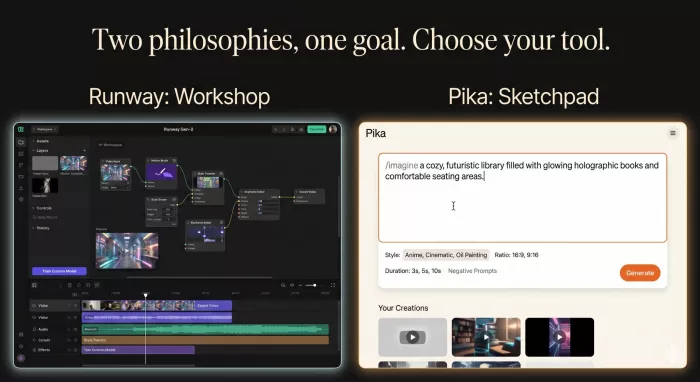
The short version? They're built for different brains. Runway feels like a film school classroom, careful, structured, occasionally slow, and rewarding when you respect the craft. Pika feels like a TikTok creator's playground, fast, expressive, slightly chaotic, and built around moments rather than scenes.
But the details are where this gets interesting. Here's everything I noticed.
The first impression you get from any AI tool tells you a lot about who built it.
Runway opens into a workspace that looks like a video editor, timelines, asset bins, model selectors, project folders. It launched in 2018 and has spent years becoming a favorite of professional filmmakers, and you can feel that lineage immediately. The platform isn't trying to seduce you with simplicity. It's trying to give you control.
Pika is the opposite. You land on a prompt box, type something, and 30 seconds later you have a clip. The interface is clean, almost minimalist, and the friction between thinking and seeing is minimal. Pika is built for speed and creativity like the Instagram of AI video, while Runway feels closer to the Adobe of the category.
Both philosophies are valid. Which one feels right depends entirely on what you're making.
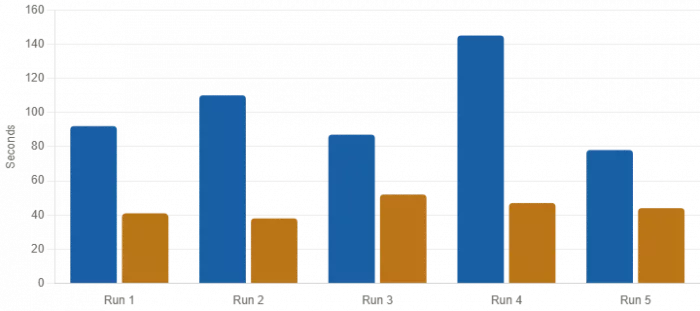
This is where the gap is most obvious. I ran the same prompt — a slow camera push through a foggy forest on both platforms five times each.
| Test Run | Runway (Gen-4/4.5) | Pika (2.5) |
| Run 1 | 92 seconds | 41 seconds |
| Run 2 | 110 seconds | 38 seconds |
| Run 3 | 87 seconds | 52 seconds |
| Run 4 | 145 seconds | 47 seconds |
| Run 5 | 78 seconds | 44 seconds |
| Average | ~102 seconds | ~44 seconds |
That's roughly a 2x speed advantage to Pika in everyday use. Pika generation times average 30-60 seconds for standard clips, with the interface optimized for rapid iteration. Runway averages 60-180 seconds for comparable clips.
The practical impact is bigger than the numbers suggest. When you're iterating on a prompt, generate, look, adjust, regenerate, Pika lets you run through 8 variations in the time Runway takes to deliver 4. For social content, that throughput difference is everything.
Speed isn't free. Look closely at the same clip from both tools and the differences become obvious.
Runway's output has more visual nuancem better lighting falloff, more believable depth of field, finer texture detail in skin and fabric. In blind tests with social media viewers watching on smartphones at normal scroll speed, the platform preference was roughly 52% Runway, 48% Pika, effectively a statistical tie. But on a desktop monitor, side-by-side, the gap is real.
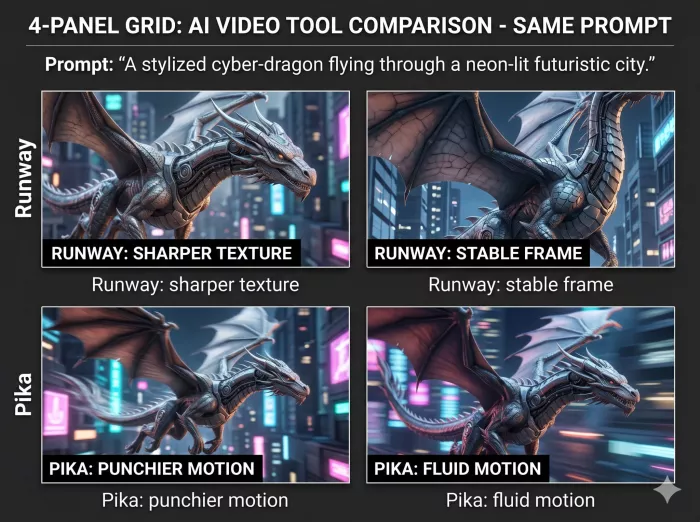
Where Runway genuinely outclasses Pika:
Character consistency. Runway Gen-4's reference image system maintains consistent character appearance, clothing, and features across multiple shots with different camera angles and lighting. This was the single most useful feature for any project that needed continuity.
Camera control. Pan, tilt, zoom, and complex motion paths feel intentional rather than approximated.
Resolution ceiling. Runway exports up to 4K. Pika tops out lower in practical use.
Where Pika holds its own:
Vibrant motion. Movement looks punchier and more fluid at social-media scales.
Stylized output. Pika's defaults are more "cinematic-looking" out of the box, even if they wouldn't survive a 4K projector.
Effects. This is where Pika genuinely has no competition.
The Pikaffects Wildcard
I want to call this out separately because it changed how I thought about Pika.
Pikaffects are physics-aware effects like Melt, Inflate, Crush, and Pop that let you apply surreal transformations to footage. No other AI video tool offers them. There's also Pikaswaps for face and object replacement, Pikaframes for keyframe interpolation, and Pikaformance for lip-sync and vocal performance on still images
These aren't just gimmicks. For social creators, they're the entire reason to choose Pika. Watching a coffee mug squish or a building inflate creates the kind of thumb-stopping moment that AI-generated cinematic clips rarely do. Runway has nothing equivalent.
If your content lives on TikTok, Reels, or Shorts, Pikaffects alone might decide the question.
Pricing in AI video is shifty, both platforms have changed their tiers multiple times in the past year. Here's where things stand based on the most current 2026 data.
| Plan | Runway ML | Pika Labs |
| Free Tier | 125 one-time credits, watermarked, Gen-1 only | 80 credits/month, 480p, watermarked |
| Entry Paid | ~$12/month (Standard, annual billing) | ~$8/month (Standard, annual billing) |
| Mid Tier | ~$28/month (Pro) | ~$28/month (Pro) |
| Top Tier | ~$76/month (Unlimited) | ~$35/month (Unlimited) |
| Commercial Rights | Included on all paid plans | Pro plan and above only |
| Watermark Removal | Standard plan and above | Pro plan and above |
Two important things most comparisons miss:
Pika's Standard plan is a trap for working creators. The Pika Standard plan doesn't include watermark removal or commercial rights. You need Pika Pro at around $28/month to actually use what you generate professionally. The $8 price point is misleading if you're trying to monetize.
Runway credits don't roll over. Credits don't roll over on monthly plans, use them before your billing date or they disappear. If you're a sporadic user, you're effectively wasting money.
| Category | Runway ML | Pika Labs |
| Best Model | Gen-4.5 (plus Veo 3, Seedance 2.0) | Pika 2.5 |
| Generation Speed | 60–180 seconds | 30–90 seconds |
| Max Resolution | 4K | 1080p (practical ceiling) |
| Max Clip Length | Up to 40 seconds | 3–10 seconds |
| Character Consistency | Industry-leading | Limited |
| Unique Effects | Aleph editing suite, Act-Two motion capture | Pikaffects, Pikaswaps, Pikaframes |
| Mobile App | Limited | Yes |
| API Access | Yes | Yes |
| Best For | Filmmakers, agencies, brand work | Social creators, rapid iteration |
| Learning Curve | Steeper | Gentle |
What I liked:
What I didn't:
What I liked:
What I didn't:
Forget the marketing. Here's how I'd decide based on what you're actually trying to make.
Pick Runway if you're:
Pick Pika if you're:
Pick both if you're:
A working creator running both client and personal channels. Honestly, this is what most professionals settle into. Many experienced creators split their use across platforms, Pika for daily social content and quick tests, Runway for client projects and anything needing control. The combined cost is meaningful but so is the output spread.
Most professional creators eventually use both rather than choosing one.
The category is moving fast. Sora 2, Kling, and Veo 3 are all worth watching, and Runway already hosts multiple non-Runway models.
a place where users could create interactive characters, explore long...

A detailed Luminarbrush.ai review based on real usage, exploring its l...

Dopple AI is not trying to be a productivity tool or a general assista...

An AI system that trades across multiple markets and generates passive...

designed specifically for hospitals, clinics, and healthcare networks...

Akool is one of the few platforms that actually bridges that gap, and...

Discussion