I'll be straight with you, I went into AaryaEditz.org expecting either a typical free preset site or a shady download trap. What I found was something more interesting: a site that's genuinely useful if you know how to use it, and genuinely risky if you don't.
If you're a mobile editor scrolling Instagram and wondering how creators get those moody, cinematic, Bollywood-style edits with one tap, you've probably already heard the name. Let me break down what's really going on, what works, what to avoid, and whether I'd actually recommend it.
Let me start with what most articles get wrong.
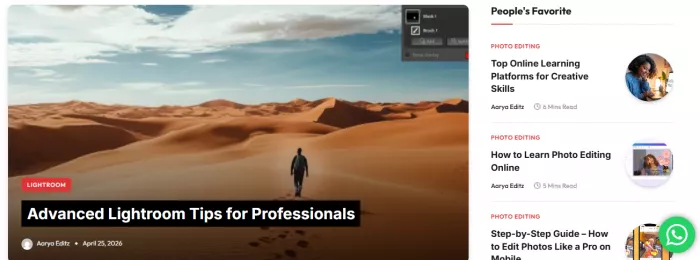
Once you understand it's a resource library and not a tool, the value becomes clearer. Here's what people are actually downloading from it.
AaryaEditz.org provides mobile editors with downloadable materials including Lightroom presets, PNG cutouts, overlays, background packs, intro templates, and short tutorials.
The most popular categories I noticed:
Lightroom presets
These come as .DNG or .XMP files. The "16K Presets" pack is the famous one, and it's everywhere on Indian creator YouTube. They give photos that signature high-saturation, moody-tone look you see all over Instagram reels.
CapCut templates
Pre-loaded video projects with transitions, effects, and beat-synced cuts already built in. You drop in your clips and it does the rest.
PNG overlays and cutouts
Fire effects, glitter, light leaks, hearts, wings, smoke. These are the elements creators layer over photos to add drama.
Background packs
JPEG and PNG backdrops for green-screen replacement or composite editing.
Alight Motion XMLs
Pre-built motion graphics presets you can import for animated text and transitions.
Tutorials
Mostly short blog-style posts. Some feel generic without the depth you'd expect from professional editing educators, but for absolute beginners they cover the basics.
Here's where I'll get specific about what using the site actually feels like.
The good moment: I downloaded a Lightroom preset pack, imported the DNG into Lightroom Mobile, copied settings to a regular phone photo, and got a transformation that genuinely looked good. The Golden Hour Glow type packs warm skin tones nicely without overdoing it. For five minutes of work, the result was better than I'd get with default filters.
The annoying moment: Getting to that download took longer than the editing did. The page had multiple "Download" buttons — most of them weren't real download buttons. They were ads disguised as buttons. Download buttons that redirect to APK or app install pages are typical of ad-heavy asset sites, but beginners often fall for them. I had to scroll past several of them to find the actual button, which was smaller and labeled with the file host (MediaFire, Google Drive).
The "wait, what" moment: I scrolled to the footer out of habit and noticed the helpful-links section was full of casino and gambling sites. The HelpFull Links footer is packed with casino and gambling sites — possible SEO backlink selling or monetization via unrelated niches. That's a trust signal you can't ignore. It doesn't make the editing files unsafe, but it tells you something about how the site funds itself.
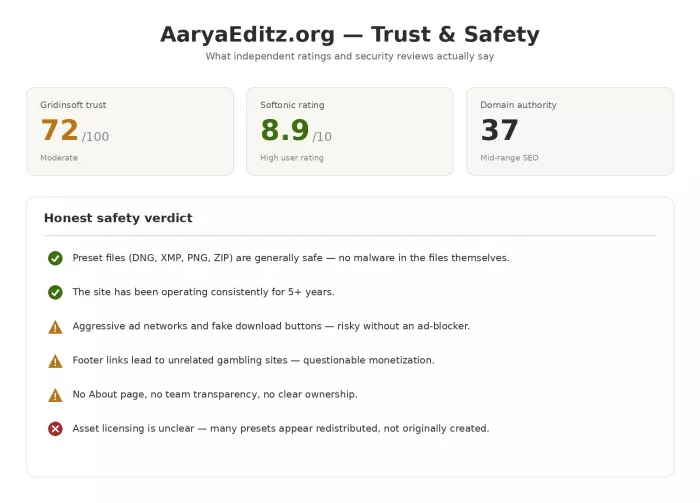
Let me show you the actual data on this rather than just saying "be careful."
If you decide to use the site, the click-path is what trips most people up. Here's exactly how to do it safely.
Once you have the file, the actual application is genuinely simple. Here's the flow for Lightroom presets, which is what most people use:
You import the DNG file into Lightroom Mobile through the "+" icon. The file shows up looking like a regular photo, but with the preset settings already baked in. Tap the three-dot menu, choose "Copy Settings," and check all the adjustment boxes. Then open the photo you actually want to edit, tap three dots again, and paste settings. That's it, your photo now has the preset look applied.
A common mistake: the photo comes out with a weird pink or magenta tint. That happens when you imported the DNG as a regular photo instead of treating it as a preset source. Delete it, re-import, and copy settings before editing anything.
For CapCut templates, the workflow is even simpler. Download the file, open it in CapCut, and the project is pre-loaded with layers ready to tweak. You just swap in your own clips and export.
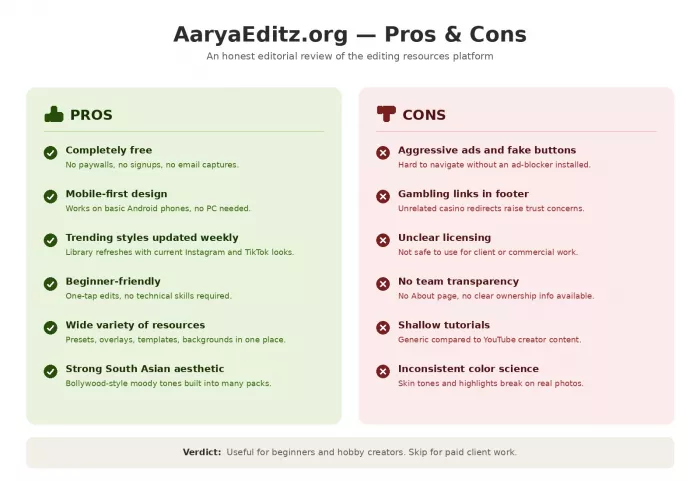
I'll give you the realistic quality breakdown rather than a single rating.
For social media use, the presets are honestly fine. They deliver trendy Instagram/TikTok aesthetics effectively, moody tones, high contrast, boosted saturation. They're optimized for mobile screens and create dramatic before/after transformations. If your goal is a punchy reel or a nice-looking selfie post, you'll get there.
For professional or paid client work, they don't hold up. Insufficient color science, inconsistent skin tone rendering, an obvious "filtered" look, and clipped highlights/shadows make these unsuitable for client or portfolio work. A professional looking at your edit will spot the preset within seconds.
The other thing worth saying out loud: many presets appear redistributed rather than originally created. That means the same preset might exist on five other sites under different names. You're not getting something exclusive.
Cutting through the marketing on both sides, here's my honest answer.
Use it if you are:
Skip it if you are:
The honest sweet spot for AaryaEditz is the early-stage creator who's still figuring out their style. It's a sandbox, not a studio.
The whole category of "free preset distribution sites" sits in what most reviewers fairly call a gray zone. Multiple reviewers describe AaryaEditz as operating in a gray zone, not a scam, not a phishing site, but not a professional platform either.
That's a fair summary. It exists because there's real demand from creators in regions where Adobe subscriptions are expensive and most professional asset marketplaces are out of reach. It fills that gap with content that's free, fast, and good enough for casual use. The tradeoff is that the funding model relies on aggressive ads and questionable footer monetization.
If you understand that tradeoff going in, you can use the site responsibly. If you don't, you'll either get scammed by a fake button or end up with a virus from clicking the wrong "Download Now."
Is AaryaEditz.org safe to use?
The actual preset files (DNG, XMP, PNG) are safe. The site itself is risky to navigate without an ad-blocker because of fake download buttons and shady footer links. Use uBlock Origin or AdGuard and you'll be fine.
Is it the same as the AaryaEditz APK app?
No. The website is a download portal for assets you use in other apps. The APK (if you find one) is a separate standalone editor. Different products under similar branding.
Can I use AaryaEditz presets for client work or commercial projects?
Not recommended. Licensing is completely unclear and many presets appear to be redistributed rather than originally created. For commercial work, use licensed sources like Adobe Creative Cloud or properly purchased preset packs.
Is there an official AaryaEditz mobile app?
Be cautious here. Several APKs claim to be official. Only download apps from the Google Play Store after verifying the publisher. APK files from random download sites carry real malware risk.
AaryaEditz.org is a download portal for editing assets, not an editor itself.
The preset and template files are safe; the site environment around them isn't, without an ad-blocker.
It's genuinely useful for beginners, hobbyists, and casual social media creators.
It's unsuitable for professional, commercial, or client-facing work.
Licensing is unclear, assume nothing on the site is cleared for commercial use.
The trust signals are mixed: 5+ years of operation and decent ratings, but no transparency, gambling footer links, and ad-heavy delivery.
If you use it: ad-blocker on, accept only DNG/XMP/PNG/ZIP files, ignore the footer, never log in with primary credentials.
Why is everyone talking about Seedance 2.0? It topped the AI video lea...

Microsoft plans to cut thousands of jobs next week across sales, consu...
Wix-owned Base44 launches Base1, its own AI model for vibe coding, bet...
Thinking about Brasssmile? Read our honest review covering content qua...

Ford rehired veteran 'greybeard' engineers after AI-powered quality in...
OpenAI launched GPT-5.6 on Friday, but a White House approval list - n...

Discussion