The decision was made in a coffee shop in February, sitting across from a half-finished pitch deck and a list of forty-three tasks that nobody on the team had time to do. The team being me, mostly, with two part-time helpers and an unpaid intern. The list included things like fix the signup flow, send the cold outreach we promised to investors, actually understand our competitor's pricing, and write the launch blog post that has been three weeks late.
A friend, who runs a slightly larger startup with an actual budget, said something that stuck. He said: stop thinking about AI tools as software, and start thinking about them as hires. You cannot afford a junior engineer, a marketer, and an ops person. You can afford forty dollars a month. Pick the four or five tools that would do the most damage if a competent person were running them, and treat them like teammates.
That reframing is what got me here. Over the next ten weeks I tried twenty-something AI tools. Most got cut. Five earned a permanent seat at my imaginary boardroom table. This piece is the honest writeup of which five, what each one costs as of May 2026, what each one actually does once the demo gloss wears off, and where it fails. The names will not surprise anyone. The reasoning behind picking each one might.
Before naming the picks, the methodology matters, because a lot of AI tool roundups read like a list of whatever the writer remembers seeing on Twitter. The criteria I used were simple but strict. Time to value mattered most: any tool that needed more than ninety minutes of setup before producing something useful got dropped. Free tier viability mattered next, because the early weeks of a startup do not have room for committed monthly spend on tools that might not stick. Integration breadth mattered because nothing in a small team works in isolation. Learning curve mattered because the founder cannot be the bottleneck on every workflow. And honest cost discipline mattered, since founders are famous for underestimating what their software bill will look like in six months.
The picks below cover the three jobs every startup has to do at once: build the product, find and reach customers, and run the operation efficiently enough that the team stays small. The full lineup, side by side, looks like this.
| Tool | Job | Free tier | Paid starts at | Best for |
| Cursor | Build | Yes (Hobby) | $20/mo Pro | Technical founders shipping product code |
| Lovable | Build | 5 daily credits | $25/mo Pro | Non-technical founders shipping MVPs |
| Perplexity | Market | 5 Pro searches/day | $20/mo Pro | Verifiable market research with sources |
| HubSpot Breeze | Market + Scale | Free CRM tier | $0.50 per conversation | Sales pipeline and customer service automation |
| n8n | Scale | Self-host (free) | $24/mo Cloud Starter | Workflow automation between every other tool |
One tool sits in two columns. That overlap is not a bug. It is the reason the stack works. The diagram below shows how each tool feeds the others across a typical founder day.
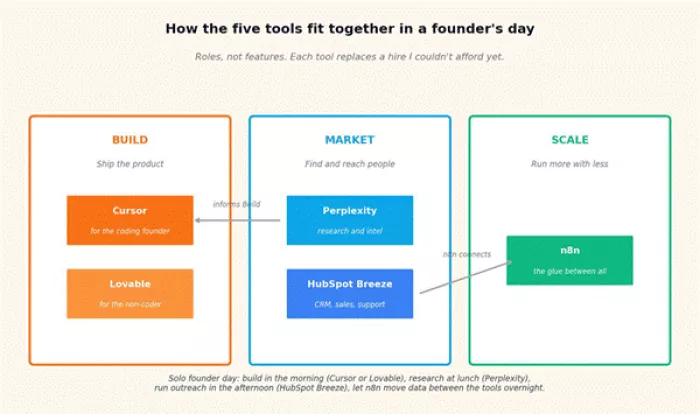
How the five tools sit across build, market, and scale.
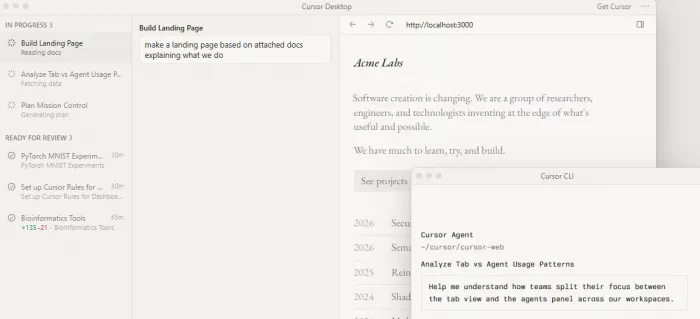
Cursor came first because the product had to ship. I write code, badly and slowly, and the gap between what I wanted to build and what I could actually finish in a weekend was the single biggest constraint on the whole startup. Cursor closed that gap more than any other tool I have ever used, and the numbers backing the product tell you why.
As of February 2026, Cursor was reported to have crossed two billion dollars in annualized recurring revenue, doubled from one billion just three months earlier, with over one million paying users and one million daily active users. Multiple industry trackers, including NxCode and AiToolDiscovery, call it the fastest-growing SaaS product in history. Stripe, OpenAI, Figma, and Adobe use it daily. None of that growth happens unless the thing genuinely works.
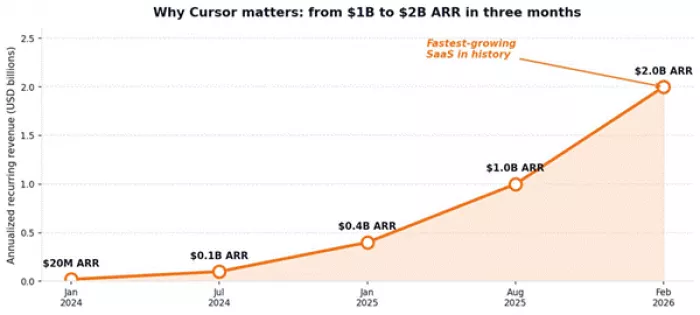
Cursor's ARR trajectory from twenty million to two billion dollars in roughly two years.
| Founded | 2022 by Anysphere, based in San Francisco |
| Best for | Technical founders writing production code |
| Free tier | Yes (Hobby), with limited Agent and Tab requests |
| Starting paid plan | $20 per month (Pro), about $16 on annual billing |
| Standout feature | Composer mode applies AI edits across multiple files at once |
| Models available | Claude Sonnet 4.6, Claude Opus 4.6, GPT-5.2, Gemini 3 Pro, plus Cursor's own |
| Notable adoption | Stripe, OpenAI, Figma, Adobe; over 1 million paying users |
| Plan | Price | What is included |
| Hobby | Free | Limited Agent requests and Tab completions, no credit card required |
| Pro | $20/mo | Unlimited Tab completions, $20 in API agent credits, all models |
| Pro+ | $60/mo | Three times the Pro credit pool, for heavy sprint weeks |
| Ultra | $200/mo | For power users with sustained heavy agentic workloads |
| Teams | $40/user/mo | Admin controls, centralized billing, shared chats and rules |
On a Sunday afternoon when a deadline is real, having Composer rewrite three files at once is the closest I have come to having a junior engineer who actually reads context.
The full-codebase awareness is the real unlock. Chat reads every file, not just the one open in front of you, which means refactors that would have taken a full afternoon now take fifteen minutes. Tab completion is genuinely predictive, anticipating the next edit based on recent changes rather than just suggesting boilerplate. Multi-model access in one interface saves the constant context-switching between Claude, ChatGPT, and Gemini that used to eat my mornings.
Cursor slows down on large codebases. Users in the r/cursor community report lag and occasional freezes on projects spanning hundreds of files. The June 2025 shift from request-based pricing to a credit-based system caught a lot of users off guard, and the math is still harder to predict than it should be. The four-cent overage cost per additional premium request adds up faster than expected for heavy users. If autocomplete is all that is needed, GitHub Copilot at ten dollars a month covers about eighty percent of the use case for half the price.
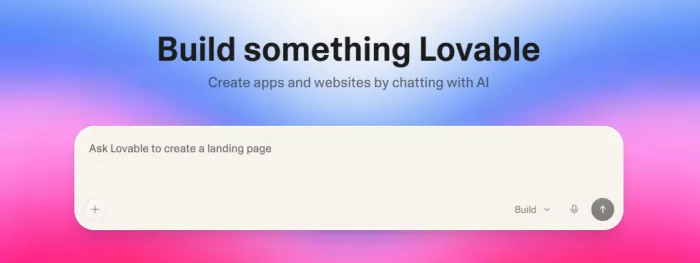
The second pick exists for a reason most founder roundups miss: not every startup has someone who writes code. The lean-team reality in 2026 is that a marketer with a clear product idea can ship a real, deployable web application without ever opening an IDE, and the tool making that possible most reliably right now is Lovable.
Lovable was founded in 2024 and has grown to around eight million users in 2026, per industry coverage including Banani and Costbench. The pitch is straightforward: describe what you want in plain English, and Lovable generates a complete full-stack application with frontend, backend, database, authentication, and deployment, that runs on a real URL and syncs the underlying code to GitHub. The company calls this approach vibe coding, and as language goes it is more accurate than most marketing copy.
| Founded | 2024, grown to about 8 million users by 2026 |
| Best for | Non-technical founders building first MVPs from prompts |
| Free tier | Yes, 5 daily credits capped at 30 per month |
| Starting paid plan | $25 per month (Pro) with 100 credits and unlimited collaborators |
| Standout feature | Full-stack apps from English prompts, code syncs to GitHub |
| Output stack | React frontend, Supabase backend, deployable URL included |
| Student discount | Up to 50% off Pro for verified .edu emails in the first year |
| Plan | Price | What is included |
| Free | $0 | 5 daily credits, 30 per month maximum, public projects only |
| Pro | $25/mo | 100 monthly credits, private projects, unlimited collaborators |
| Business | $50/mo | SSO authentication, opt-out of model training, team features |
| Enterprise | Custom | Group access controls, custom integrations, dedicated support |
Credits deplete based on task complexity. Simple edits cost around half a credit, while complex features like adding authentication burn about 1.2 credits per request, per the company's own pricing documentation. The credit math is the single source of complaint in most Lovable reviews, since unclear prompts and bug loops can chew through the monthly allowance faster than expected. Annual billing saves roughly seventeen percent across the paid tiers.
Lovable is the fastest path from idea to deployed app for someone who cannot or does not want to code. The output is React with a Supabase backend, which is a stack any future developer can pick up and extend. Code syncing to GitHub from day one means there is no vendor lock-in, which is the single biggest argument against most no-code tools. For testing whether an idea works before committing to a real engineering team, Lovable does in days what would otherwise take a freelance developer about fifteen thousand dollars and several months.
Lovable struggles with production-grade requirements. Custom API connections, complex backend logic, and original UI work all become harder once the prompts get specific. Reviews from Flowstep and Superblocks both flag that Lovable is better at validating ideas than running real businesses. The right mental model is to use Lovable to prove the idea works, then graduate the codebase to Cursor or a real engineering team once revenue justifies it.
The third pick is the one most founders underrate, because research feels like the kind of work that should be free. It is not, in the sense that the time spent reading thirty articles to understand a single market dynamic is the most expensive currency a small team has. Perplexity replaced about three hours of reading per week for me, which is what made it worth twenty dollars a month and then some.
The product positioning is precise: Perplexity is an AI search engine, not a general assistant. The free tier is more usable than most freemium AI products, with unlimited standard searches and five Pro searches per day. Pro at twenty dollars a month or two hundred a year unlocks unlimited Pro searches, model switching across the major frontier models, plus five dollars in API credits for developer experimentation.
| Founded | 2022, headquartered in San Francisco |
| Best for | Founders who need verifiable research with cited sources |
| Free tier | Yes, unlimited standard searches and 5 Pro searches per day |
| Starting paid plan | $20 per month (Pro), about $16.67 on annual billing |
| Standout feature | Source citations on every answer, model switching in Pro |
| Models in Pro | GPT-5.4, Claude Sonnet 4.6, Claude Opus 4.6, Gemini 3.1 Pro, plus more |
| Comet browser | Free across iOS, Android, Windows, Mac as of March 2026 |
| Student discount | $10 per month with verified .edu email through SheerID |
| Plan | Price | What is included |
| Free | $0 | 5 Pro searches per day, basic citations, throttled at peak |
| Pro | $20/mo | Unlimited Pro searches, all frontier models, 40MB file uploads, $5 API credits |
| Max | $200/mo | Model Council across three frontier models simultaneously, top priority |
| Enterprise Pro | $40/user/mo | Shared spaces, admin controls, SSO for teams |
| Enterprise Max | $325/user/mo | Audit logs, expanded analytics, dedicated support |
Every answer comes with footnoted links to the pages the model pulled from. That single feature changed how I do due diligence on competitors. I can ask a question, scan the cited sources directly, and trust that the synthesis is not hallucinated, because the receipts are right there.
The source citations are the entire game. Claude and ChatGPT will write a better essay; Perplexity will hand back a research brief that can be verified in three minutes. The free Comet browser, released in March 2026 across all major platforms, makes the same intelligence available outside the website itself. The model switching in Pro is genuinely useful: Claude for nuanced writing, GPT for code and structured reasoning, Gemini for multimodal tasks involving images or video.
The narrow focus is a feature for research and a weakness for everything else. Perplexity is not the tool for drafting marketing copy, writing code, or running creative work. Heavy threads exhaust the free Pro search cap quickly, and the data may be used for training on the Free and Pro tiers, which is worth knowing for anyone working with sensitive information. The two hundred dollar Max tier is hard to justify unless research is the central job of the company.
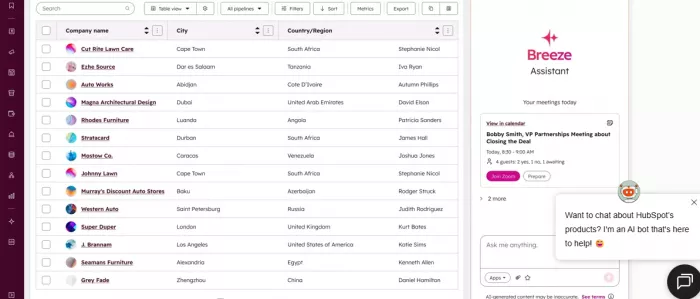
The fourth pick is where things get genuinely interesting in 2026, because HubSpot did something most software companies still refuse to do. On April 14, 2026, HubSpot shifted two of its Breeze AI agents to outcome-based pricing. The Customer Agent now charges fifty cents per resolved conversation. The Prospecting Agent charges one dollar per qualified lead recommended for outreach. That is a meaningful shift in how AI software gets sold, and it makes Breeze worth a hard look even for founders who would normally avoid the HubSpot ecosystem on price grounds.
The performance data HubSpot published alongside the pricing change is the part that caught my attention. Across more than eight thousand activations, the company reports that Breeze Customer Agent resolves sixty-five percent of conversations and cuts resolution time by thirty-nine percent. Prospecting Agent activations grew fifty-seven percent quarter over quarter. Those numbers come from HubSpot itself, so a healthy skepticism is warranted, but the outcome-based pricing model is essentially a put-your-money-where-your-mouth-is move. If the agents do not resolve the conversation, HubSpot does not get paid.
| Launched | Breeze AI layer rolled out across HubSpot CRM through 2024 and 2025 |
| Best for | Sales pipeline and customer service automation inside a unified CRM |
| Free tier | Yes, full HubSpot CRM tier is free forever for early-stage teams |
| Starting paid use | $0.50 per resolved conversation on Customer Agent |
| Standout feature | Outcome-based pricing on agents (introduced April 14, 2026) |
| Performance claim | 65% conversation resolution, 39% faster handle time (HubSpot data) |
| Connectors | Native Anthropic Claude connector, ChatGPT deep research integration |
| Plan | Price | What is included |
| Free CRM | $0 | Contact management, basic email, deal tracking, free forever |
| Breeze Assistant | Free | In-app AI for drafts, summaries, lookups across most plans |
| Customer Agent | $0.50 per conversation | Replies to customers across channels, hands off when needed |
| Prospecting Agent | $1 per qualified lead | Researches prospects, recommends outreach targets |
| Sales Hub Starter | $9 to $15 per seat | Pipeline automation and sales workflows |
| Sales Hub Professional | $100 to $890 per seat | Full Breeze Agent access with credit pool |
The outcome-based pricing on agents is genuinely novel, and it removes the buying risk that has held back AI adoption inside CRMs for the last two years. The agents are also grounded in the company's actual customer data, relationship history, and business context, which makes their output more useful than generic models bolted onto a CRM. The free CRM tier remains one of the most generous in the category, and it stays usable well past the early-stage phase. The native Claude connector and the deep research connector to ChatGPT mean integration with the rest of an AI stack is straightforward.
Most of the high-value agents are gated behind Professional or Enterprise hub plans, which lock out the very startups that need them most. The outcome-based pricing helps, but it does not change the underlying ecosystem cost once a team grows past the free CRM. The credit system underneath the outcome pricing is also still in place for several features, which means real monthly cost is harder to forecast than a flat subscription would be. For teams already committed to another CRM, switching for the AI layer alone is a heavier lift than the AI savings justify.
The fifth pick is the one most founder lists skip, because it does not feel as glamorous as a coding agent or a CRM. It is the workflow automation layer that connects everything else, and once it is in place, the rest of the stack runs on autopilot in ways that would otherwise require a small operations team. The tool that won this slot for me was n8n.
The honest case for n8n over Zapier or Make is built on a single quirk in how it counts usage. Zapier charges per task, where each step in a workflow counts as a separate task. n8n charges per workflow execution, where a ten-step workflow and a thirty-step workflow both count as one execution. For complex automations, this single difference makes n8n dramatically cheaper at scale, often by ten to twenty times, per the InstaPods and Goodspeed pricing analyses.
| Founded | 2019, fair-code licensed (source available, self-hostable) |
| Best for | Workflow automation glue between every other tool in the stack |
| Free tier | Self-hosted Community Edition is free with unlimited executions |
| Starting paid plan | $24 per month (Cloud Starter) for 2,500 executions |
| Standout feature | Per-execution billing, so complex workflows cost the same as simple ones |
| Integrations | Over 400 apps, plus custom code nodes for everything else |
| Startup Program | EUR 400/month with unlimited executions for <20 employees, <EUR 5M funding |
| Plan | Price | What is included |
| Community (self-hosted) | Free | Unlimited executions, runs on your own infrastructure |
| Cloud Starter | $24/mo | 2,500 executions, unlimited workflows and users |
| Cloud Pro | $60/mo | 10,000 executions, environment variables for staging |
| Cloud Business | $800/mo | 50,000 executions, SSO, audit logs |
| Startup Program | EUR 400/mo | Unlimited executions and enterprise features (eligibility based) |
| Enterprise | Custom | Tailored compliance, support, and infrastructure agreements |
The night I realized n8n had earned its slot, I was on a flight back from a customer meeting and a workflow I had built two weeks earlier had already moved sixteen leads through enrichment, scored them, sent the high-priority ones to HubSpot, drafted personalized outreach for each, and dropped notification cards into Slack for the team to review. None of that required me to be awake.
The per-execution billing model is the cost lever that justifies switching from Zapier even when Zapier is easier to use. The 400-plus app integrations cover almost everything a small team needs, and the custom code nodes mean the rest can be patched in JavaScript. Native AI workflow capabilities are baked in for free, with the underlying model costs passed through to whatever API key is connected. For technical founders, the self-hosted Community Edition on a five-dollar VPS is the cheapest credible automation tool on the market.
The learning curve is real. The visual builder is intuitive enough for simple flows, but anything beyond five or six steps requires understanding webhooks, conditional logic, error handling, and occasionally writing JavaScript in the code nodes. The self-host path is cheaper but adds infrastructure responsibility, which is the wrong cost for a non-technical founder. For teams without engineering capacity, Zapier or Make are still the right answers despite the higher per-action cost, because they handle the maintenance burden invisibly.
The full stack, priced at entry tiers and assuming a single-founder operation, runs under one hundred and forty dollars a month. That number changes once any single tool gets used heavily, but it is a useful anchor for what a credible startup AI stack costs in mid-2026.
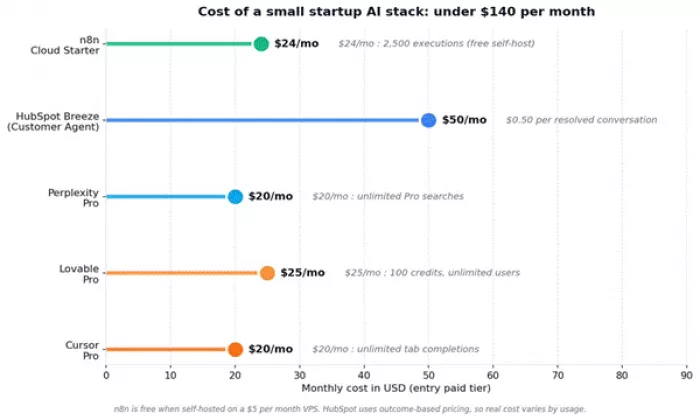
Entry-tier monthly cost across the five tools. n8n self-hosted brings the floor down to under three dollars.
The way the stack works in practice is simpler than the diagram makes it look. A typical week for me runs like this. Mornings are for building, which means Cursor for the code I touch directly and Lovable for the experimental features I am prototyping with the design lead. The afternoons are split between Perplexity research, which feeds the positioning and content work, and HubSpot for sales outreach and customer conversations. The evenings are when n8n quietly moves data between everything, pulling form submissions into HubSpot, syncing enrichment back to a Notion table, triggering Slack alerts when high-value leads arrive, and shipping a daily digest at 6am that summarizes what happened overnight.
The point is not that any one of these tools is irreplaceable. There are credible substitutes for each. Cursor has Windsurf and GitHub Copilot. Lovable has Bolt and v0. Perplexity has Claude with web search. HubSpot has Salesforce and Pipedrive. n8n has Make, Zapier, and Activepieces. The reason this specific combination earned its slot is that the integrations between them are clean, the cost is predictable enough at the bottom of the pricing curve, and each one does one job well rather than five jobs adequately.
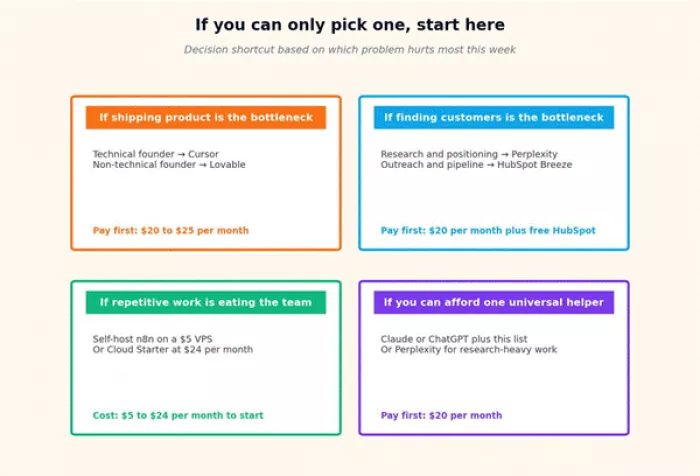
A quick decision shortcut for founders just starting to build their stack.
An honest list has to include what got cut, because the negatives are where most founder time is wasted. Five tools made the deepest impression during testing and still did not make the final cut. The reasoning matters as much as the picks.
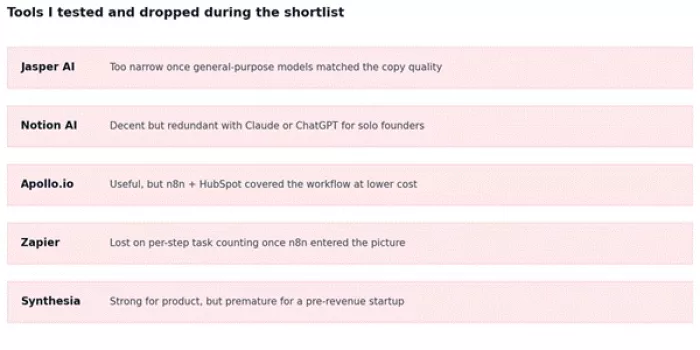
The five tools tested seriously and dropped, with the single-sentence reason for each.
Three months into running this stack, the lesson that surprised me most is that the tools did not replace anyone. They replaced specific tasks, sometimes hours at a time, but the thinking, the prioritization, the customer conversations, and the actual product decisions still sit on the founder's desk. Anyone who picks these five and expects to coast is going to be disappointed. The leverage is real, but it is leverage on execution, not leverage on judgment.
The other thing worth saying is that this stack will look different a year from now. Cursor's pricing model has already changed twice since 2024. HubSpot just rolled out outcome-based pricing in April. Lovable's credit system will probably evolve as the underlying models get cheaper. Perplexity launched Max in July 2025 and will keep adding tiers. n8n introduced the Startup Program quietly and may change its terms. The point of writing this down in May 2026 is to capture a snapshot of what works right now, not to predict what works in May 2027.
For founders just starting out, the simplest recommendation is this: pick one of the build tools, either Cursor or Lovable depending on whether code is in your skillset, and one research tool, Perplexity, and start there. Add HubSpot when sales becomes a job rather than a series of conversations. Add n8n when manual work starts showing up in your week and you want it gone. The total monthly spend for a serious early-stage AI stack in 2026 is somewhere between forty and one hundred and forty dollars a month, which is genuinely accessible. The barrier is not the cost. The barrier is choosing well and committing.
If this stack does the job that it is doing for me, the next milestone is the moment when I actually need to hire a human. That hire will not be a junior engineer or a marketing assistant or an ops coordinator. It will be a senior person who can use these same tools at ten times my speed. That is the version of the future the AI tooling industry is quietly building toward, and it is closer than most founders realize.

a place where users could create interactive characters, explore long...

A detailed Luminarbrush.ai review based on real usage, exploring its l...

Dopple AI is not trying to be a productivity tool or a general assista...

An AI system that trades across multiple markets and generates passive...

designed specifically for hospitals, clinics, and healthcare networks...

Akool is one of the few platforms that actually bridges that gap, and...

Discussion