Slidesgo is one of those tools most people do not actively plan to use. You usually arrive there while rushing to finish a presentation, scrolling Google Images, or searching “free Google Slides templates” at 2 a.m. That context matters, because Slidesgo is built for urgency more than deliberation.
I did not approach Slidesgo as a marketer or a reviewer skimming feature lists. I approached it as a user who needed presentable slides fast, wanted to avoid design debt, and was curious whether paying for premium would genuinely improve outcomes or just remove watermarks. What follows is not a definition of Slidesgo. It is an investigation into how it actually feels to use, what you really get for free versus paid, and whether it deserves a place in a serious workflow in 2026.
Slidesgo is a template marketplace focused primarily on Google Slides and PowerPoint. It is owned by Freepik Company, the same parent organization behind Freepik and Flaticon. That matters because Slidesgo inherits both strengths and weaknesses from that ecosystem.
1. Professionally designed presentation templates
2. Ready-to-use layouts for education, business, and creative work
3. Optional AI-assisted generation
4. Tight integration with Google Slides
1. They do not want to design from scratch
2. Canva feels too flexible or brand-heavy
3. They need something that looks “done” quickly
4. They want slide structure, not just visuals
Slidesgo is less about creativity and more about visual scaffolding.
The first thing you notice is volume. Slidesgo does not suffer from a lack of templates. Categories are broad but predictable:
1. Education (lesson plans, school subjects, workshops)
2. Business (pitch decks, reports, timelines)
3. Medical and science
4. Marketing and social media
5. Personal projects and portfolios
Discovery feels fast but shallow. You scroll, click, preview, and repeat. Templates look polished at a glance, but after 15–20 minutes you start noticing repetition:
1. Same layout logic reused
2. Similar typography across categories
3. Color palette changes doing most of the work
This is not inherently bad, but it limits uniqueness.
1. Downloads require attribution
2. Many templates are locked behind premium
3. Ads and upgrade nudges appear often
1. One-click download
2. No attribution
3. Full access to library
Templates open cleanly in Google Slides or PowerPoint. No broken elements, no missing fonts if you stay within Google’s ecosystem.
Slidesgo templates are structurally opinionated. They assume:
1. Title slide
2. Section dividers
3. Content-heavy middle slides
4. Visual-heavy closing slides
Customization is straightforward but limited:
1. Colors are easy to change
2. Text placeholders are flexible
3. Layout changes beyond intended structure take effort
If you like control, you may feel boxed in. If you like guidance, Slidesgo works well.
Slidesgo slides present well on-screen. Typography is readable. Visual balance holds up in real meetings and classrooms. The main weakness shows up in longer decks:
For short to medium presentations, it holds up. For long strategy decks, it can feel templated.
1. Static presentation templates
2. Infographic-heavy decks
3. Icon and chart-focused slides
4. Education-first structured decks
1. Deep data visualization
2. Advanced animation logic
3. Interactive storytelling
Slidesgo’s AI tools are positioned as productivity helpers:
1. AI presentation generator
2. Topic-based slide outlines
3. Auto-filled text suggestions
1. Output is generic
2. Useful for structure, not insight
3. Requires heavy editing for serious use
AI here saves time, not thinking.
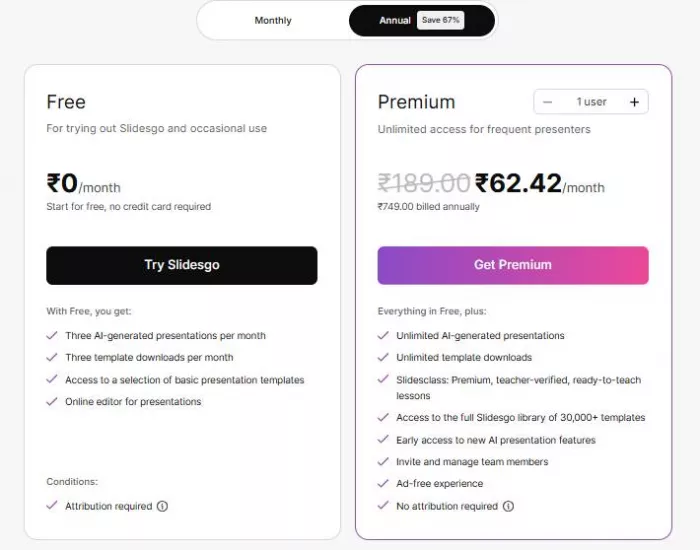
1. Limited access to templates: Only a portion of the library is available, which means many of the more polished or niche designs are locked behind premium.
2. Mandatory attribution: You must credit Slidesgo on your slides, which can look unprofessional in client or formal presentations.
3. Ads: The interface regularly pushes upgrade prompts, breaking focus while browsing or downloading.
4. Slower workflow: Extra steps like attribution checks and locked previews add friction when you are working fast.
Free Slidesgo works in a pinch, but it often feels like a preview rather than a complete solution.
1. Full template library: All categories and designs are unlocked, making it easier to find something that fits without compromise.
2. No attribution: Slides look clean and fully yours, which matters for professional or commercial use.
3. Cleaner interface: Ads and upgrade nudges disappear, making browsing and editing smoother.
4. Faster downloads: Templates open and load with fewer interruptions, which adds up over time.
Premium mainly improves comfort and speed rather than adding entirely new capabilities.
1. Individual annual plans: Best value for solo users who create presentations regularly.
2. Monthly options: Useful for short-term needs but less cost-effective over time.
3. Limited team use: Team workflows are possible through the Freepik ecosystem, but collaboration features remain basic.
For individuals, the pricing feels fair. For teams, Slidesgo lacks the structure needed for shared, collaborative presentation work.
1. Very useful: Helps students create clean, structured presentations quickly without design experience.
2. Strong academic templates: Many templates are clearly built for subjects, reports, and classroom use.
3. Attribution can be annoying but manageable: Free plans require crediting Slidesgo, which is tolerable for school work but not ideal.
1. One of Slidesgo’s strongest audiences: The platform is clearly designed with educators in mind.
2. Lesson-ready structures: Slides often follow teaching logic, reducing the need to plan layouts from scratch.
3. Time-saving layouts: Teachers can focus on content instead of formatting slides.
1. Useful for internal decks: Works well for team updates, planning meetings, or internal reviews.
2. Less ideal for client-facing, brand-specific work: Templates can clash with strict brand guidelines or feel too generic.
1. Good for speed: Enables fast turnaround when deadlines are tight.
2. Risk of overused visuals: Popular templates can appear familiar to audiences.
3. Requires customization to stand out: Meaningful edits are needed to avoid a templated look.
| Platform | Approx. Rating |
| Trustpilot | ~2.4 / 5 |
| G2 | ~4.7 / 5 |
| Reddit sentiment | Mixed |
| App marketplaces | Generally positive |
| Platform | Strength | Weakness |
| Canva | Flexibility | Overdesigned |
| Beautiful.ai | Automation | Limited creativity |
| Gamma | AI-native | Less control |
| SlidesCarnival | Free access | Smaller library |
| Slidesgo | Structure + polish | Repetition |
Slidesgo sits between Canva’s freedom and Beautiful.ai’s rigidity.
Slidesgo is not a design tool. It is a presentation shortcut. Used consciously, it is valuable. Used blindly, it becomes visually pleasing but forgettable.
That distinction is what determines whether Slidesgo feels like a smart purchase or just another subscription you eventually cancel.
AI-powered image editing has moved far beyond simple filters. Today’s...
AI chat platforms built around fictional characters and roleplay conve...
AI chat platforms have evolved far beyond simple question-and-answer b...
Platform OverviewCutout.pro is an AI-powered image editing platform de...

AI chat platforms designed for roleplay and interactive conversations...

Goth AI is a character-based AI chat platform designed for dark, gothi...

Discussion