If you are choosing between Rytr and Writesonic, you probably care about one thing: which one actually helps you produce better content faster without wasting money.
Both tools promise AI-powered writing. Both offer blog generation, ads, product descriptions, and templates. But the experience, depth, and value you get are not the same.
This guide skips the marketing claims and walks through what it actually feels like to use each tool.
When you land on Rytr, it feels simple. Minimal interface. Template dropdown. Tone selector. Short input box. Generate.
It clearly feels built for:
1. Students
2. Freelancers
3. Small business owners
4. Budget-conscious creators
It does not feel enterprise-heavy. It feels accessible. You can start generating content in minutes without setup complexity.
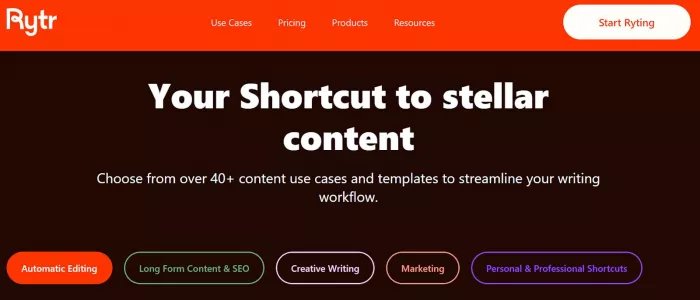
The overall vibe: affordable, quick, no-frills AI writing.
Writesonic feels more like a marketing suite. The interface is broader. You see tools for blog writing, SEO, Chatsonic (chat-style AI), landing pages, ads, and more.
It feels built for:
1. SEO bloggers
2. Agencies
3. Marketing teams
4. Content-heavy businesses
There is more structure. More dashboards. More workflow depth.

The vibe: performance-driven marketing tool, not just a copy generator.
Let’s walk through real use cases.
Using Rytr
You choose a blog template.
Enter topic.
Select tone.
Set output length.
Click generate.
You get a short outline or a few paragraphs. If you want a full 1,500-word article, you generate section by section.
What happens in practice:
1. Good for shorter posts
2. Struggles with long-form structure
3. Requires manual stitching
4. Can repeat ideas if you regenerate too much
It works, but it feels modular.
Using Writesonic
You use the AI Article Writer.
Enter your topic and keywords.
It generates:
1. Title options
2. Outline
3. Structured sections
4. Long-form content
The workflow feels more guided.
What happens in practice:
1. Better long-form coherence
2. Stronger structure
3. SEO-aware suggestions (on certain plans)
4. Less manual stitching required
Writesonic clearly handles long-form blogging better.
Rytr
Fast. Very fast.
Enter product info.
Choose tone.
Generate.
You get punchy, short ad copy. Great for:
1. Facebook ads
2. Google ads
3. Simple promotional text
Output is short, sharp, usable with minor tweaks.
Writesonic
Also strong at ads, but slightly more structured.
It may generate:
1. Multiple headline variations
2. Expanded ad descriptions
3. Performance-style formatting
The difference:
Rytr = quick micro-copy.
Writesonic = more marketing-framed messaging.
For pure speed, Rytr wins.
For campaign alignment, Writesonic edges ahead.
Rytr
Good for:
1. Short ecommerce listings
2. Simple Amazon-style blurbs
It generates clean 3–6 sentence descriptions.
But if you want:
1. SEO-heavy product descriptions
2. Long-form optimized product pages
3. Conversion-focused formatting
It starts feeling limited.
Writesonic
Better suited for ecommerce scale.
It can generate:
1. SEO-optimized product descriptions
2. Feature-benefit breakdowns
3. Structured copy blocks
It feels more “conversion-aware” compared to Rytr’s simpler outputs.
Speed
● Rytr wins for instant short outputs.
● Writesonic is slightly heavier but still fast.
Output Quality
● Rytr: Good for simple content. Can feel generic.
● Writesonic: More structured and layered.
Long-Form Reliability
● Rytr: Not ideal for 1,500+ word blogs.
● Writesonic: Clearly stronger for long-form content.
SEO Capability
● Rytr: Basic.
● Writesonic: More SEO-aligned tools and structure.
Templates & Customization
● Rytr: Simpler template system.
● Writesonic: Broader content suite with more workflow depth.
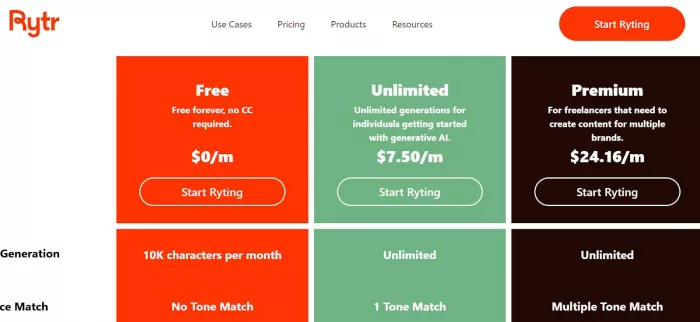
Entry-level plans are affordable.
What you realistically get:
1. Limited characters per month
2. Core templates
3. Tone options
4. Basic plagiarism checking
Good for:
1. Light users
2. Students
3. Side projects
But if you scale output heavily, you may hit character limits quickly.
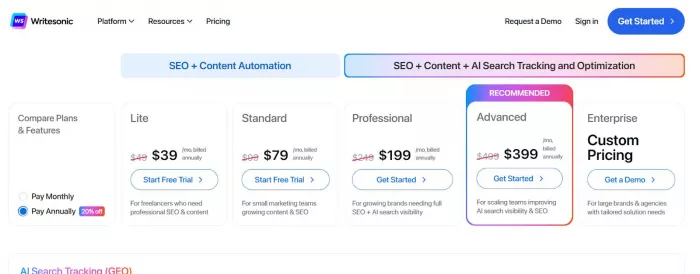
Entry plans cost more than Rytr.
You typically get:
1. Higher word limits
2. Blog article generator
3. SEO tools
4. Access to Chatsonic
5. Multiple AI models (depending on tier)
It is more expensive, but also more capable.
No hidden magic, you pay more because you get more.
| Category | Rytr | Writesonic |
| Best For | Budget short-form writing and quick content needs | SEO-focused blogs, longer marketing pieces, and structured campaigns |
| Explanation | Rytr is optimized for short snippets like social captions, quick emails, product descriptions, and simple blog intros. It gets you usable content fast without complexity. | Writesonic is built for deeper, longer content that needs structure, SEO alignment, and consistency — ideal for blogs, landing pages, and comprehensive marketing workflows. |
| Blog Depth | Basic | Strong |
| Explanation | Rytr can generate short blog drafts or sections but doesn’t naturally produce deep, connected long-form articles. You’ll need to stitch sections yourself. | Writesonic is better at creating full drafts with outlines, headers, and flow — closer to a complete blog article with structure intact. |
| Ad Copy | Fast & simple | Structured & strategic |
| Explanation | Rytr quickly generates punchy, straightforward ads but with limited variations or strategic framing. | Writesonic generates multiple headline options, variations, and formats with an eye toward performance messaging. |
| SEO Tools | Minimal | Integrated options |
| Explanation | Rytr doesn’t have built-in SEO guidance beyond basic keyword inclusion. You’ll need external tools for optimization. | Writesonic offers SEO-focused templates and integrations that help guide keyword placement and content structure for better search visibility. |
| Pricing | Lower | Higher |
| Explanation | Rytr is more affordable to start with and easier on monthly budgets, especially for casual users. | Writesonic costs more but includes more features, higher word limits, and tools that scale for teams and SEO projects. |
| Learning Curve | Very easy | Moderate |
| Explanation | Rytr’s simple interface and fewer options make it very beginner-friendly. You can generate content with minimal setup. | Writesonic’s broader toolset, templates, and workflows take a bit more time to learn, but they unlock deeper functionality once you’re comfortable. |
If you are a student → Choose Rytr
Cheap. Simple. Enough for essays, basic content, and small projects.
If you run an SEO blog → Choose Writesonic
Long-form handling and SEO structure matter more than price.
If you manage client accounts or agency work → Choose Writesonic
You need scalability and structured outputs.
If you are on a tight budget → Choose Rytr
It gives you the essentials without draining your wallet.
If you only need quick ad copy or social captions → Rytr is perfectly fine.
If you want a more complete marketing content engine → Writesonic makes more sense.
Rytr is the efficient, affordable copy assistant.
Writesonic is the broader, SEO-focused marketing platform.
Your decision depends on whether you prioritize cost and simplicity or depth and scalability.

AI chat platforms designed for roleplay and interactive conversations...
Goth AI is a character-based AI chat platform designed for dark, gothi...

Artificial Intelligence (AI) is increasingly taking a front seat in sh...
AI copywriting tools have become core infrastructure for modern market...

What AI Insights DualMedia Is and Why It ExistsAI Insights DualMedia r...

For decades, the enterprise mainframe has been the quiet backbone of g...

Discussion