Identity and access management (IAM) has moved from a “nice‑to‑have” security layer to a strategic backbone for Zero Trust, compliance, and hybrid‑cloud operations. As organizations adopt dozens of SaaS tools, remote work, and complex multi‑cloud architectures, centralized control over who can access what, from which device, and under which conditions has become critical to reducing breach risk and ensuring governance. Modern IAM platforms now blend SSO, MFA, lifecycle automation, and privileged access controls to deliver secure, seamless experiences for employees, partners, and customers across the entire digital estate.

Okta is a cloud‑first IAM platform focused on SSO, MFA, lifecycle management, and granular access policies for workforce and customer identities.
Key features
● Single Sign‑On to thousands of apps with centralized policy control.
● MFA with contextual and risk‑based authentication.
● Universal Directory and lifecycle management with HR‑driven provisioning.
● API access management and customer identity (CIAM) capabilities.
Pricing (indicative)
● Workforce SSO starts around $2 per user/month.
● Workforce suites (Starter/Essentials) advertised from $6+ per user/month, billed annually.
● Customer Identity Cloud from roughly $23–$35+ per month depending on tier.
● Identity Governance and advanced modules add extra per‑user costs.
Pros
● Comprehensive IAM coverage across workforce and customer.
● Large integration ecosystem and strong automation options.
● Mature security controls (adaptive MFA, API security).
Cons
● Complex, fragmented pricing; costs rise as you add modules.
● Learning curve for full lifecycle automation and governance.
● Some users cite licensing complexity and support/integration challenges.
Best for
● Mid‑market and enterprise organizations wanting cloud‑native IAM with rich integrations and flexible add‑ons, especially those standardizing SSO + MFA across many SaaS apps.
Microsoft Entra ID is the cloud identity backbone for Microsoft 365 and Azure, offering directory services, SSO, MFA, and conditional access.
Key features
● SSO to Microsoft 365, Azure, and thousands of SaaS apps.
● Built‑in MFA, conditional access, and identity protection (risk‑based access).
● B2B collaboration, self‑service password reset, and hybrid identity support.
● Add‑ons like Entra Permissions Management and Verified ID.
Pricing (indicative)
● Entra ID Free: basic directory and SSO for Microsoft services.
● Entra ID P1: about $6 per user/month, adds conditional access and advanced features.
● Entra ID P2: higher‑tier pricing, adds advanced identity protection and governance.
● Often bundled in Microsoft 365 E3/E5 subscriptions.
Pros
● Cost‑effective for organizations already on Microsoft 365.
● Deep integration with Windows, Azure, and Microsoft security stack.
● Scales well with pay‑as‑you‑go cloud model.
Cons
● Advanced Zero Trust and risk‑based features locked behind P2 and other add‑ons.
● Non‑Microsoft environments sometimes require more effort to integrate.
● Admin UX and complexity can be challenging in large, hybrid setups.
Best for
● Organizations heavily invested in Microsoft 365/Azure that want native IAM with strong conditional access at competitive per‑user pricing.
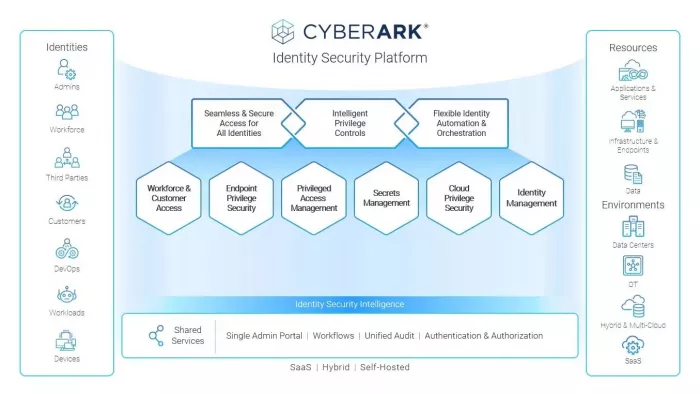
CyberArk is best known for privileged access management (PAM) but now offers broader identity security for workforce and machine identities.
Key features
● Privileged access management and session monitoring for admin accounts.
● Secrets management for non‑human identities (API keys, service accounts).
● Adaptive MFA, SSO, and workforce identity capabilities.
● Threat analytics to detect anomalous privileged behavior.
Pricing (indicative)
● Workforce Identity editions commonly $2–$5 per user/month for SSO/MFA tiers.
● Enterprise PAM deployments often run into tens of thousands of USD annually, with some estimates around $30,000+ per deployment.
● Pricing is typically quote‑based and considered premium.
Pros
● Market‑leading privileged access controls and monitoring.
● Strong secrets management for DevOps and non‑human identities.
● Highly scalable for complex hybrid and multicloud environments.
Cons
● High implementation complexity and steep learning curve.
● Premium pricing, often out of reach for smaller organizations.
● Users report complex configuration and maintenance.
Best for
● Large enterprises and regulated industries prioritizing PAM, session recording, and secrets management at scale.
Ping Identity offers enterprise IAM for workforce and customer identities with strong federation, SSO, and adaptive authentication.
Key features
● SSO, MFA, and adaptive authentication for workforce and customers.
● Identity governance, API security, and federation for complex environments.
● Support for hybrid deployments across on‑prem and cloud.
Pricing (indicative)
● Workforce plans: Essential around $3 per user/month, Plus about $6 per user/month; Premium is quote‑based.
● Customer (CIAM) plans: often $20,000–$50,000+ annually depending on tier and scale.
● Pricing is enterprise‑oriented and usually negotiated.
Pros
● Comprehensive feature set spanning SSO, MFA, CIAM, and governance.
● Proven reliability and performance for mission‑critical use cases.
● Flexible deployment for complex, multi‑region enterprises.
Cons
● Implementation typically requires significant technical expertise.
● Premium pricing can be high for SMBs.
● Some reports of learning curve and slower support responses in complex incidents.
Best for
● Global enterprises with complex hybrid architectures that need advanced federation, CIAM, and governance beyond basic SSO/MFA.
Duo focuses on secure access with strong MFA, device trust, and risk‑based policies, and increasingly positions itself as a security‑first IAM solution.
Key features
● Phishing‑resistant MFA and passwordless options.
● Device health checks and adaptive policies (network, location, device posture).
● SSO capabilities and VPN‑less remote access (Duo Network Gateway in higher tiers).
● User self‑service for enrollment and device remediation.
Pricing (indicative)
● Free edition for up to 10 users.
● Duo Essentials: about $3 per user/month (SSO, MFA, basic policies).
● Duo Advantage: about $6 per user/month (advanced Zero Trust, device health, richer reporting).
● Duo Premier: roughly $9 per user/month with VPN‑less access and full device trust.
Pros
● User‑friendly MFA with strong security and device intelligence.
● Granular risk‑based policies and good admin experience.
● Free tier suits small teams and pilots.
Cons
● Advanced capabilities only in higher‑tier plans.
● Dependency on mobile devices and network connectivity.
● Pricing can be higher than basic MFA tools at large scale.
Best for
● Organizations prioritizing phishing‑resistant MFA, device trust, and Zero Trust access, especially when they already have an IAM but need stronger authentication controls.
ForgeRock delivers full‑suite IAM plus identity governance, with support for workforce, consumer, and even IoT identities.
Key features
● SSO, MFA, adaptive risk assessment, and self‑service.
● Identity governance and administration (IGA) integrated with IAM.
● Flexible deployment: on‑prem, cloud, multi‑cloud, and hybrid.
● High scalability to millions of identities and extensive APIs.
Pricing (indicative)
● Pricing is generally quote‑based and annual.
● Analyses suggest starting ranges roughly $100–$500+ per unit or user (exact models vary).
● Often positioned as an enterprise‑grade, higher‑priced option.
Pros
● Full‑suite IAM + IGA on a single platform.
● Highly scalable and flexible for complex environments.
● Strong connectors and extensibility via APIs.
Cons
● Limited transparent public pricing; procurement is sales‑driven.
● Complexity and cost can be high for smaller teams.
● Implementation typically needs skilled resources.
Best for
● Large enterprises needing unified IAM + IGA across workforce and consumer identities with hybrid or multi‑cloud deployments.
IBM Security Verify is a cloud‑based and hybrid IAM platform that combines SSO, adaptive access, identity governance, and strong integration with complex enterprise environments. It is positioned for organizations that need mature governance and compliance capabilities alongside access management.
Key features
● Cloud SSO and MFA with risk‑based access and behavioral analytics for workforce and B2C identities.
● Identity governance (access reviews, role mining, policy‑based provisioning) tightly integrated with access management.
● Hybrid deployment support and rich connectors for legacy apps, mainframes, and on‑prem directories, plus APIs for custom integrations.
Pricing (indicative)
● Typically licensed per user/month with different SKUs for access management and governance.
● Enterprise‑oriented pricing, often negotiated annually; TCO is comparable to other tier‑1 IAM suites in the mid‑to‑upper range for large deployments.
Pros
● Strong governance and compliance features built into the same platform as SSO/MFA.
● Mature support for complex hybrid and legacy environments.
● Backed by IBM’s broader security portfolio (SIEM, threat intel, SOAR).
Cons
● Implementation and configuration can be complex; often requires specialized expertise or partner support.
● Pricing and SKUs are not very transparent, making cost estimation harder.
● Admin UX and agility can feel slower compared to some cloud‑native competitors.
Best for
● Large and upper‑mid‑market enterprises with significant legacy or hybrid infrastructure that need integrated IAM + governance for audit‑heavy industries.
OneLogin (now part of One Identity) is a cloud‑first IAM platform focused on secure SSO, MFA, and user lifecycle management, with a reputation for being relatively easy to deploy and manage. It is popular among mid‑market organizations that want robust access management without the overhead of a heavyweight suite.
Key features
● Centralized SSO to SaaS and on‑prem apps, with a large catalog of pre‑built integrations.
● MFA with support for OTP, push, SMS, and contextual policies, plus passwordless options in higher tiers.
● Unified directory, user provisioning, and basic governance features, along with integrations to HR systems and ITSM tools.
Pricing (indicative)
● Per‑user/month subscription with separate packages for SSO, MFA, and more advanced security features.
● Entry‑level pricing is competitive for SMB and mid‑market, while advanced packages move into typical enterprise IAM ranges.
Pros
● Friendly admin experience and relatively straightforward deployment for cloud apps.
● Good balance of usability, security, and cost for growing organizations.
● Strong app catalog and integrations for common SaaS tools.
Cons
● Less depth than specialist PAM or full IGA suites; complex compliance regimes may need additional tools.
● Some advanced capabilities and logging/analytics require higher‑tier plans.
● On‑prem and very complex hybrid scenarios may demand more customization.
Best for
● Small to mid‑sized and mid‑market organizations looking for a cloud‑centric SSO + MFA platform with decent lifecycle features and simpler operations than heavyweight enterprise IAM suites.
A well‑chosen IAM solution should balance security, usability, and cost while fitting your existing stack and regulatory context. When comparing the eight options covered above, consider your primary environment (Microsoft‑centric, multi‑cloud, or hybrid), the depth of governance and PAM you need, and how fast your identity landscape is growing. For many mid‑market organizations, starting with cloud‑first suites like Okta or Microsoft Entra ID and then layering in specialized PAM (such as CyberArk) or strong MFA (like Duo) as maturity increases offers a pragmatic roadmap that scales without over‑engineering from day one.

AI-powered image editing has moved far beyond simple filters. Today’s...

AI chat platforms built around fictional characters and roleplay conve...

AI chat platforms have evolved far beyond simple question-and-answer b...

Platform OverviewCutout.pro is an AI-powered image editing platform de...

AI chat platforms designed for roleplay and interactive conversations...

Goth AI is a character-based AI chat platform designed for dark, gothi...

Discussion