Modern small businesses no longer rely on bulky, mechanical tills; they need smart, connected “cash registers” that can accept cards and wallets, track inventory, and generate reports that actually help run the business. Today’s best options are really compact POS systems that bundle hardware and software into one streamlined countertop setup, giving even the smallest shop access to features that once required enterprise‑grade solutions.
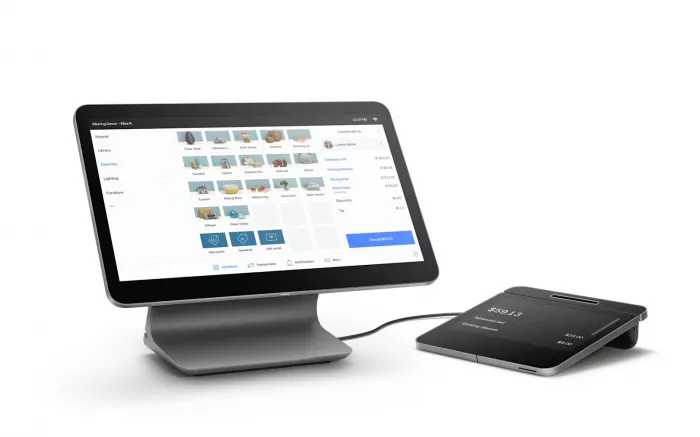
Square Register is a fully integrated, dual‑screen POS register designed specifically for small and micro businesses that want low upfront software costs and simple payments.
Key features
● All‑in‑one hardware: 13″ seller touchscreen plus detachable customer display with built‑in card reader.
● Accepts tap, chip and swipe, plus digital wallets like Apple Pay and Google Pay.
● Free POS software tier with inventory, basic reporting, customer directory and online store tools.
● Offline payments support for up to 24 hours if internet drops.
Pros
● Very quick to set up with transparent, small‑business‑friendly pricing and no long‑term contract.
● Strong ecosystem: online store, invoices, marketing, loyalty and appointments all plug into the same platform.
Cons
● Flat‑rate processing can get expensive for very high‑volume or B2B merchants with large tickets.
● Requires stable internet for best performance, even though short‑term offline mode exists.
Why choose Square Register
● Ideal if you want a modern “cash register” that just works out of the box, with minimal IT effort and predictable costs.
● Best suited to cafes, salons, boutiques and pop‑ups that value simplicity, attractive hardware and strong add‑on tools more than ultra‑low payment fees.
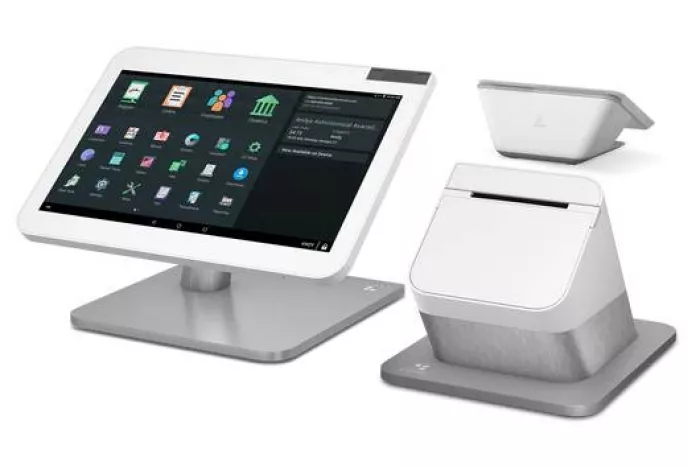
Clover Station Duo is a dual‑screen, countertop POS register built for growing retailers and restaurants that want fast checkout and scalable hardware.
Key features
● 14″ merchant touchscreen plus 8″ customer‑facing display for order review, tipping and digital receipts.
● Integrated high‑speed receipt printer and cash drawer, with optional barcode scanners and handheld devices.
● Accepts chip, swipe and contactless, including Apple Pay, Google Pay and Samsung Pay.
● Clover App Market for adding loyalty, advanced inventory, staff scheduling and vertical‑specific tools.
Pros
● Premium, durable build that supports high‑volume, multi‑device environments without feeling “entry level”.
● Flexible: wide range of industry‑specific plans and add‑ons help tailor the system to your workflow.
Cons
● Higher upfront hardware cost than lightweight registers and tablet‑based setups.
● Pricing and contract terms can differ by merchant service provider, so you must compare offers carefully.
Why choose Clover Station Duo
● A strong choice for busy cafes, counter‑service restaurants and retail stores that need fast lines, tip workflows and a polished customer‑facing experience.
● Makes sense if you prefer a robust hardware bundle and can justify the higher cost with steady volume and multi‑location ambitions.
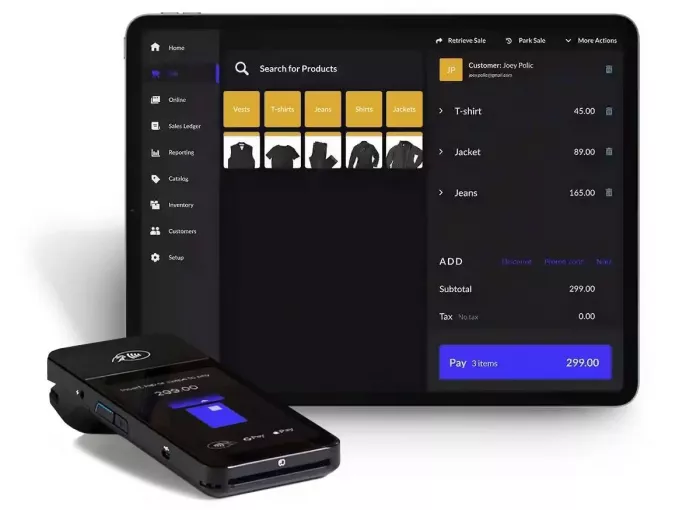
Lightspeed Retail is a cloud POS platform popular with inventory‑heavy retailers; paired with standard POS hardware, it effectively becomes a modern cash register with advanced stock tools.
Key features
● Real‑time, cross‑location inventory with multi‑store pricing, purchase ordering and vendor management.
● Customizable workflows, customer profiles and detailed sales reporting for data‑driven merchandising.
● Supports standard POS hardware bundles: iPad or desktop terminal, receipt printer, barcode scanner and cash drawer.
● Integrations for e‑commerce, accounting and loyalty create an omnichannel retail stack.
Pros
● Excellent for catalog‑heavy retailers that need tight stock control and reports, not just basic ringing up.
● Strong multi‑location support for businesses planning to scale beyond a single shop.
Cons
● Overkill for very small operations that only need a simple till and basic reporting.
● Higher monthly subscription than entry‑level POS systems, especially once you add advanced modules.
Why choose Lightspeed Retail
● Ideal if your “cash register” also needs to be your inventory brain, especially for bike shops, apparel, hobby and specialty retail.
● A good fit when you plan for growth, want deep reporting and can treat POS as a strategic investment rather than just a payment terminal.
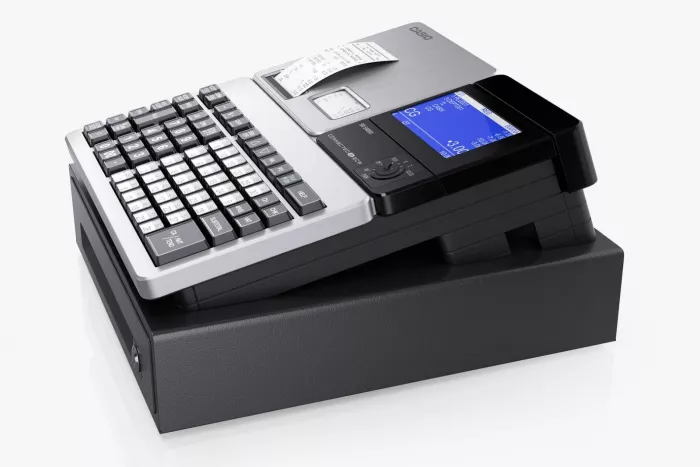
Casio’s SR‑C4500 is a more traditional electronic cash register (ECR) that still suits small retailers who want a one‑time hardware purchase without cloud subscriptions.
Key features
● 72 programmable keys to map products and shortcuts for faster checkouts.
● Supports up to 50 clerks so each staff member has a login for tracking performance.
● Built‑in receipt printer and cash drawer, with options for external accessories depending on configuration.
● Does not require internet access, making it suitable for basic, offline environments.
Pros
● Simple, durable and predictable; no recurring software fees and minimal configuration.
● Offline operation suits kiosks, markets or locations with unreliable connectivity.
Cons
● Lacks advanced POS features like cloud reporting, CRM, online ordering and integrations.
● Limited future‑proofing as many vendors focus on POS systems rather than new ECR models.
Why choose Casio SR‑C4500
● Works well for budget‑conscious retailers that need a reliable physical till without subscription software.
● A practical choice for very small shops or backup lanes where card payments and deep analytics are not essential.
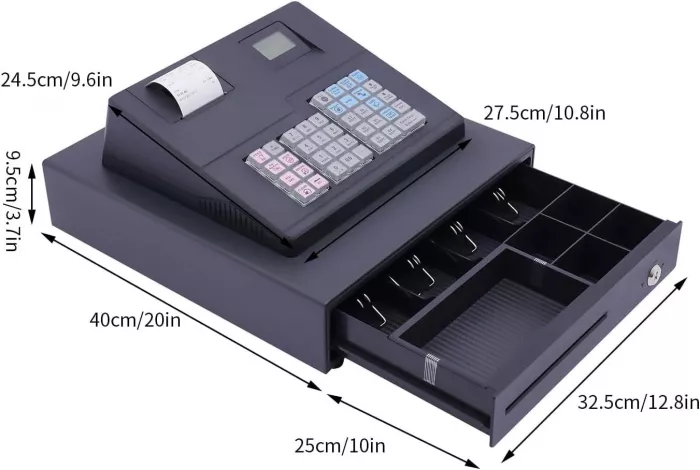
Sharp’s XE‑A407 is a feature‑rich manual cash register that bridges the gap between basic tills and full POS for small retail stores.
Key features
● Dual thermal receipt printing and fast print speeds for efficient checkout.
● Up to 7,000 PLUs, 99 departments and 40 clerk IDs for detailed categorization and staff tracking.
● 3.7‑inch operator display and PC link via SD card for basic data export and logo customization.
● Integrated cash drawer and compact footprint for counter‑top setups.
Pros
● Very capable for a standalone machine, with deep PLU and department support for product‑heavy retail.
● One‑time purchase with no ongoing software fees or required internet connection.
Cons
● No built‑in customer database, loyalty or omnichannel integrations like modern POS systems.
● Programming PLUs and departments can be more manual and time‑consuming than using a cloud POS interface.
Why choose Sharp XE‑A407
● Ideal if you want strong product tracking in a traditional register form factor without moving to a full cloud POS.
● Good for small groceries, convenience stores and mini‑marts that prioritize quick cash transactions and a familiar till layout.
Choosing the right cash register or POS register is ultimately about matching capabilities to how your business actually operates, not just picking the most popular brand name. If you prioritize simplicity and quick deployment, systems such as Square Register and Clover Station Duo deliver polished hardware and cloud features with predictable monthly costs, while retailers that care more about deep stock control or one‑time hardware investments can lean toward Lightspeed or robust traditional tills like the Casio SR‑C4500 and Sharp XE‑A407. By weighing ratings, total cost of ownership, and the specific pros and cons outlined for each of the five options, small businesses can implement a register setup that speeds up checkout, tightens financial visibility and remains flexible as transaction volumes, channels and customer expectations grow.

AI-powered image editing has moved far beyond simple filters. Today’s...

AI chat platforms built around fictional characters and roleplay conve...

AI chat platforms have evolved far beyond simple question-and-answer b...
Platform OverviewCutout.pro is an AI-powered image editing platform de...

AI chat platforms designed for roleplay and interactive conversations...

Goth AI is a character-based AI chat platform designed for dark, gothi...

Discussion