AppsFlyer is one of those platforms many app marketers have heard of, even if they have never used it deeply. It shows up in discussions about mobile growth, advertising attribution, and analytics, usually alongside names like Adjust and Branch. In 2026, AppsFlyer continues to play a central role for companies that want to understand where their app users come from and what those users do after installing an app.
This article explains AppsFlyer in clear, practical terms. It focuses on what the platform actually does, how people use it day to day, how pricing generally works, and who it makes sense for.
At its core, AppsFlyer is a mobile measurement and attribution platform. Its main job is to answer a simple but critical question for app owners:
Which marketing efforts actually bring users who install, open, and take actions inside my app?
When a company runs ads on Google, Meta, TikTok, or other networks, AppsFlyer helps connect those ads to real user activity. Without a tool like this, marketers would mostly be guessing which campaigns work.
AppsFlyer is mainly used by:
1. Mobile app companies
2. App marketers and growth teams
3. Product teams tracking installs and in-app events
4. Agencies managing ads for multiple apps
It is not designed for regular consumers. It is a business tool that sits quietly in the background while apps collect performance data.
AppsFlyer works quietly in the background of a mobile app. Most users never notice it, but for businesses, it connects marketing efforts with real results.
Here’s how the process actually plays out.
AppsFlyer is added to the app during development so it can track where new users come from. This setup is done once and works in the background. It does not affect app performance or user experience. Regular users never notice that AppsFlyer is there.
The app is promoted through ads on platforms like search engines and social media. Each ad carries tracking information that AppsFlyer can recognize. This allows the platform to tell different campaigns apart. Multiple ads and platforms can be tracked at the same time.
When someone sees an ad and taps on it, they are sent to the app store. AppsFlyer records this interaction as part of the tracking process. The user does not have to take any extra steps. Everything happens automatically in the background.
After clicking the ad, the user installs the app from the app store. AppsFlyer links that install back to the original ad click. This makes it clear which campaign led to the install. Organic installs are tracked as well.
AppsFlyer identifies details such as the ad network, campaign name, and ad group. This helps businesses see which ads are performing well. The system can also detect duplicate or suspicious installs. All this information appears in real-time reports.
Once installed, the user opens and uses the app like any other app. There are no pop-ups, delays, or visible tracking messages. The experience stays smooth and unchanged. AppsFlyer continues working quietly in the background.
Actions such as sign-ups, purchases, or subscriptions are recorded as events. These events show how valuable users really are, not just how many installed the app. Businesses use this data to measure engagement and revenue. It helps focus on quality users.
AppsFlyer gathers all install and event data into clear dashboards. Reports show performance by campaign, platform, and time period. Teams can quickly compare results across channels. This removes the need for manual tracking.
Marketing teams review AppsFlyer reports to see what is working. Campaigns that perform well receive more budget. Poorly performing ads can be paused or adjusted. Over time, this leads to better results and less wasted spending.
AppsFlyer offers many tools, but most users consistently rely on a small set of core features. These are the features that directly help teams understand where users come from, what they do inside the app, and whether marketing spend is actually paying off.
Mobile attribution is the foundation of AppsFlyer. It shows exactly where each app install comes from, whether it is organic or driven by a paid ad. By assigning credit to the correct ad network, campaign, and ad group, AppsFlyer helps businesses avoid guesswork. This allows teams to clearly see which marketing channels are delivering real results and which ones are not.
Installs alone do not show success, which is why in-app event tracking is so important. AppsFlyer tracks meaningful actions such as account sign-ups, purchases, subscriptions, level completions, and other custom events set by the app team. These events reveal how users behave after installing the app. Instead of focusing only on volume, teams can measure user quality and long-term value.
Deep linking allows users to open an app directly to a specific screen, such as a product page or offer, instead of the home screen. Deferred deep linking does the same thing even if the app is not installed yet, guiding the user to the correct screen after installation. This feature is commonly used for referral programs, promotional campaigns, and smoother onboarding experiences. It helps reduce friction and improves conversion rates.
AppsFlyer includes fraud protection tools that detect suspicious activity like fake installs, click flooding, or bot traffic. These tools help businesses avoid paying for installs that do not come from real users. By filtering out invalid traffic, AppsFlyer helps protect marketing budgets and improves the accuracy of performance data. This is especially important for apps running large ad campaigns.
Instead of digging through raw data, most users rely on AppsFlyer’s dashboards and reports. These dashboards show installs, in-app events, retention, and performance across different ad platforms in one place. The reports are designed to be easy to read and share with teams. This makes it easier to spot trends, compare campaigns, and make faster decisions.
With stricter global privacy regulations, AppsFlyer includes built-in tools to help apps stay compliant. These features support user consent management, data anonymization, and compliance with regulations like GDPR. For businesses, this reduces legal risk and builds trust with users. For users, it ensures their data is handled more responsibly.
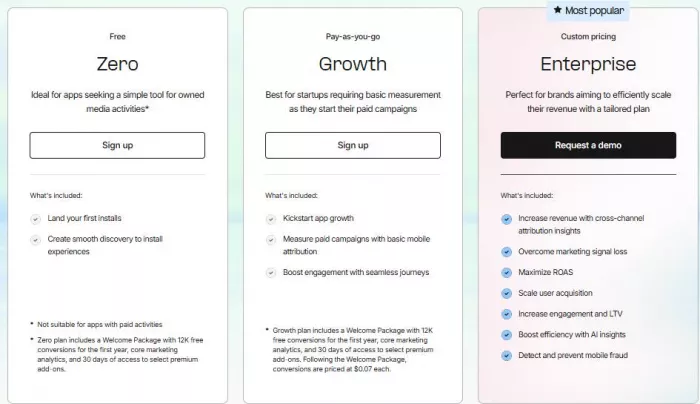
This is the entry-level plan meant for very small apps or teams that are not running paid ads yet.
1. Apps tracking only organic or owned media installs
2. Early testing and setup
1. Basic install tracking
2. Simple discovery-to-install journeys
3. A welcome package with 12,000 free conversions for the first year
4. Core analytics
5. 30 days of access to select premium add-ons
1. Not suitable for apps running paid advertising
2. Very limited once growth or ad spend begins
In short, this plan is mainly for testing and early-stage validation, not real growth.
This is the most practical plan for startups that have started running paid campaigns.
1. Apps beginning paid user acquisition
2. Teams that need basic mobile attribution
1. Paid campaign measurement
2. Basic mobile attribution
3. Engagement tracking through user journeys
4. Welcome package with 12,000 free conversions for the first year
5. Core analytics
6. 30 days of access to select premium add-ons
1. After the free conversions are used, each conversion costs $0.07
2. Costs increase directly with usage
This plan is designed to scale gradually, making it suitable for growing apps that want predictable, usage-based pricing.
This is the full-scale plan for large brands and high-growth apps.
1. Apps running large, multi-channel campaigns
2. Businesses focused on ROAS, LTV, and revenue optimization
1. Cross-channel attribution insights
2. Advanced protection against marketing signal loss
3. ROAS optimization
4. Scalable user acquisition tools
5. Engagement and lifetime value analysis
6. AI-powered insights
7. Advanced mobile fraud detection and prevention
1. Fully custom
2. Requires a demo and sales discussion
3. Based on scale, traffic, regions, and feature needs
This plan is built for serious ad spenders who need deep insights and protection at scale.
When AppsFlyer is used in real campaigns, its value becomes more obvious over time. Instead of abstract features, users mainly notice how it simplifies decision-making and removes uncertainty from marketing efforts.
AppsFlyer replaces guesswork with clear data. Users can see exactly which ads, platforms, and campaigns lead to installs and meaningful actions. This makes it easier to understand what is actually driving growth. Over time, patterns become visible that would otherwise be hidden.
When performance is clearly measured, budget decisions become faster and more confident. Poorly performing campaigns can be paused without hesitation, while high-performing ones receive more spend. This reduces wasted advertising money. Even small teams can manage budgets more efficiently.
AppsFlyer acts as a single source of truth for performance data. Marketing, product, and leadership teams all view the same reports and metrics. This reduces confusion and internal debates about numbers. Decisions are based on shared data rather than assumptions.
As apps grow and expand into new ad platforms and regions, tracking can quickly become messy. AppsFlyer keeps everything organized in one place. New campaigns and networks can be added without breaking existing tracking. This makes scaling smoother and more manageable.
AppsFlyer is widely recognized and supported by major ad networks and partners. This reduces setup issues and compatibility problems. Teams spend less time fixing integrations and more time analyzing results. That reliability is a big reason many companies stick with it long-term.
While AppsFlyer is powerful, users often point out a few limitations that are worth understanding before committing to the platform.
AppsFlyer’s pricing scales with install volume and usage. For small teams or early-stage startups, costs can rise quickly as campaigns grow. If budgets are tight, the platform may feel expensive compared to lighter analytics tools. This is one of the most common concerns among new users.
Although the interface is clean and well designed, attribution itself is not always easy to understand. New users often need time to learn how installs, events, and reports are calculated. Without basic knowledge of mobile marketing, the data can feel overwhelming at first.
AppsFlyer delivers the most value when an app is running paid ad campaigns. If an app relies mostly on organic traffic, many core features offer limited insights. In such cases, simpler analytics tools may be enough. AppsFlyer is built primarily for performance marketing.
AppsFlyer is designed specifically for mobile apps. It does not function as a full website analytics platform. Businesses looking for combined web and app analytics may need additional tools. This narrow focus is intentional but limits its use outside mobile growth.
In practical use, AppsFlyer often becomes a background tool rather than something people actively “use” every hour.
Typical daily usage includes:
1. Checking install and event reports
2. Monitoring campaign performance
3. Reviewing fraud alerts
4. Sharing dashboards with stakeholders
Once set up correctly, most work happens automatically.
AppsFlyer remains a strong and reliable choice for mobile attribution in 2026. It does not try to be flashy. Instead, it focuses on accuracy, scale, and trust.
If you run a mobile app and spend money on ads, AppsFlyer can help you understand what works and what does not. If you are not advertising or do not need detailed attribution, the platform may feel unnecessary or expensive.
In short:
AppsFlyer is worth using if mobile growth matters to your business. It is not a casual analytics tool, but for serious app marketing, it continues to be one of the most practical options available.

There was a time when manual Google Ads management was a competitive a...

Artificial intelligence is no longer a peripheral tool in the justice...

Long-form video is still king for depth, but short-form clips dominate...

San Francisco, February 2026 — Samsung has officially set the sta...

AI video generation is moving fast, and new tools appear almost weekly...

Geek culture has grown massively over the years, spreading from niche...

Discussion