Long-form video is still king for depth, but short-form clips dominate reach. Platforms like TikTok, YouTube Shorts, and Instagram Reels reward fast, punchy moments that capture attention within seconds.
The problem is simple but painful:
● Manually finding highlights from a 30–60 minute video can take hours
● Vertical reframing for Shorts requires extra editing work
● Subtitles and punchy cuts are time-consuming to produce consistently
This is exactly the gap tools like 2Short AI are trying to fill. They promise to automatically turn long videos into viral-ready short clips using artificial intelligence.
But how well does it actually work? Let’s break it down with real data, user feedback, and practical insights.
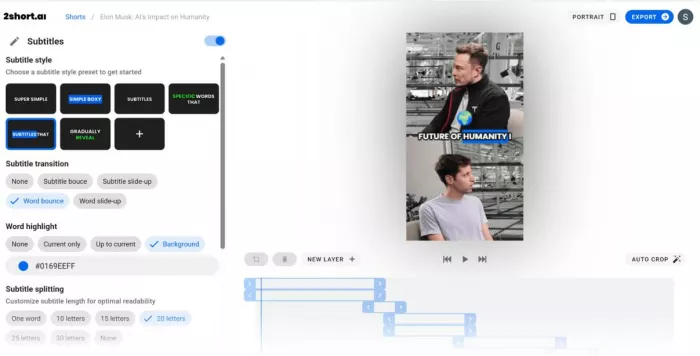
2Short AI positions itself as an AI-powered video repurposing tool focused primarily on creators who publish long-form content such as:
● Podcasts
● YouTube videos
● Interviews
● Webinars
● Educational content
According to the platform and user testing, the main capabilities include:
The AI scans long videos and identifies moments likely to perform well as short clips. It typically looks for:
● Speech intensity
● Engagement signals
● Topic transitions
● Viral-style pacing
Why it matters: This removes the most time-consuming part of short-form repurposing.
2Short AI automatically generates subtitles and allows:
● Font styling
● Color changes
● Word-by-word highlighting
● Emoji support
Efficiency impact: Many creators report subtitle generation that previously took 15–30 minutes per clip now takes under 2 minutes with AI assistance.
One of the platform’s standout features is AI face tracking, which:
● Keeps the speaker centered
● Converts horizontal video to vertical
● Dynamically adjusts framing
This is especially useful for podcast and talking-head content.
Supported formats typically include:
● 9:16 for Shorts/Reels/TikTok
● 1:1 for Instagram
● 16:9 for YouTube
This eliminates manual cropping workflows in tools like Premiere Pro.
Creators can add:
● Logos
● Progress bars
● Custom captions
● Branded templates
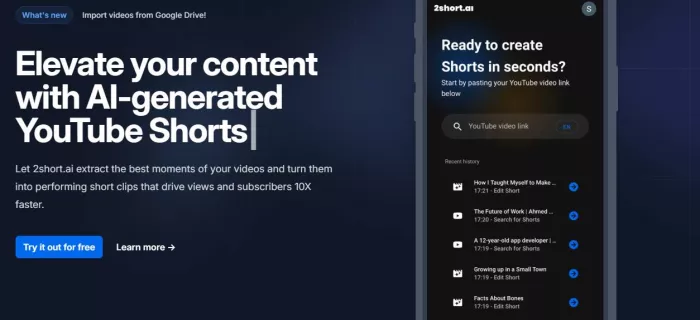
Here is what the real workflow looks like in practice.
You can typically:
● Upload a video file
● Paste a YouTube link
● Import podcast recordings
Best results: Clear speech and minimal background noise.
Once uploaded, the AI begins processing.
It analyzes:
● Speech patterns
● Engagement signals
● Topic peaks
● Conversational energy
Processing time usually ranges from 2 to 10 minutes depending on video length.
The system then generates suggested short clips automatically.
Creators are shown multiple AI-suggested segments.
At this stage you can:
● Accept suggested clips
● Trim start and end points
● Discard weak segments
● Generate additional variations
Reality check: AI suggestions are often good but not perfect. Most creators still do light review.
This is where polish happens.
You can adjust:
● Subtitle style
● Font and colors
● Emoji emphasis
● Face tracking position
● Zoom behavior
● Brand elements
Most users report spending 2–5 minutes per clip here.
Final clips can be exported for:
● TikTok
● YouTube Shorts
● Instagram Reels
● LinkedIn video
Exports are typically fast because heavy processing already occurred earlier.
Imagine a podcast creator with a 45-minute interview.
● 60–90 minutes to find highlights
● 30 minutes editing vertical format
● 20 minutes adding captions
● Total: ~2 hours per clip
● Upload and AI analysis: ~5 minutes
● Review suggestions: ~5 minutes
● Subtitle and branding tweaks: ~3 minutes
● Total: ~13 minutes per clip
This is why many creators are paying attention.
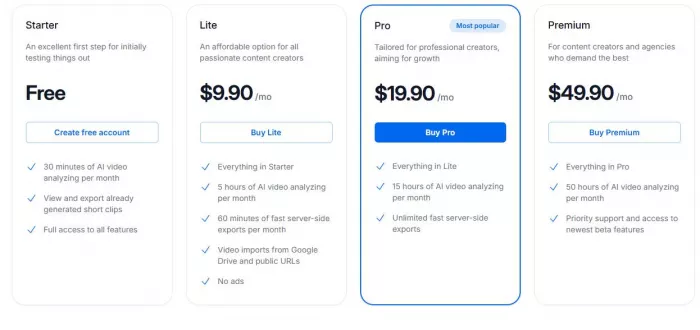
1. Starter (Free):
Includes 30 minutes of AI video analysis per month and access to core features. Best for beginners testing the tool.
2. Lite ($9.90/month):
Offers 5 hours of AI video analysis, limited fast exports, video imports, and no ads. Good for regular creators.
3. Pro ($19.90/month, most popular):
Provides 15 hours of AI analysis and unlimited fast exports. Designed for serious or growing content creators.
4. Premium ($49.90/month):
Includes 50 hours of AI analysis plus priority support and beta feature access. Aimed at agencies and high-volume users.
In short: As you move up the tiers, you get more AI processing hours, faster exports, and better support.
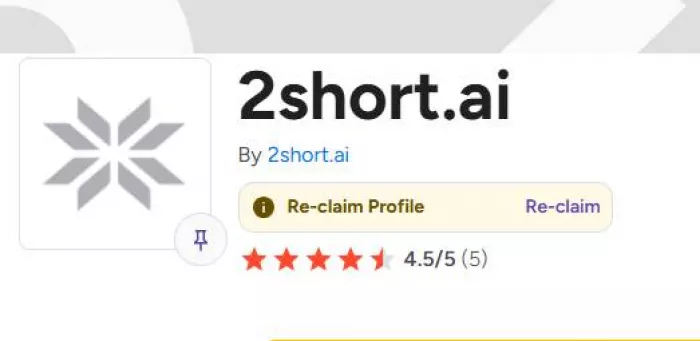
Current rating: 4.5 out of 5
Total reviews: 5 verified reviews
On G2, 2Short AI holds a strong 4.5/5 average based on a small but positive review pool.
What this actually means
● Users consistently praise the speed of turning long videos into Shorts
● Ease of use is frequently mentioned as a major advantage
● Some reviewers note AI sometimes misses the best moments
Official star rating: Not consistently published
Overall sentiment: Strongly positive early-adopter feedback
Trustpilot rating: No substantial verified listing for 2Short AI
Review volume: Extremely limited or absent
As of now, 2Short AI does not have a meaningful Trustpilot review base, which is important to note for credibility.
From aggregated user feedback:
● Major time savings
● Easy subtitle generation
● Good for podcasts and talking-head videos
● Clean vertical reframing
“It cuts hours from my Shorts workflow.”
“Great for repurposing podcasts quickly.”
Not all feedback is glowing.
● AI sometimes picks weak highlights
● Limited control compared to pro editors
● Works best for speech-heavy content
● Occasional subtitle inaccuracies
Performance reality: The tool is strong for structured talking content but weaker for cinematic or highly visual footage.
Before uploading content, creators should understand the trade-offs.
Because videos are uploaded to cloud servers:
Potential risks include:
● Sensitive content exposure
● Third-party processing
● Data retention policies
Best practice: Avoid uploading confidential client material unless terms are clearly reviewed.
Like all AI video tools:
● Highlight detection is probabilistic
● Subtitles may require manual correction
● Face tracking can fail in multi-person scenes
Human review is still necessary for professional output.
Automated clipping raises some concerns:
● Context may be lost in short clips
● Quotes can be unintentionally misleading
● Over-optimization for virality
Responsible creators still need editorial judgment.
| Pros | Cons |
| Huge time savings for repurposing | Not perfect highlight selection |
| Excellent for talking-head content | Limited cinematic control |
| Automatic subtitles included | Cloud upload required |
| Smart vertical reframing | Subtitle errors occasionally |
| Beginner-friendly workflow | Less powerful than full editors |
| Good batch clip generation | Smaller review ecosystem than older tools |
Here is how it stacks up against major competitors.
| Feature | 2Short AI | Opus Clip | Vidyo.ai | Descript |
| Auto highlight detection | Yes | Yes | Yes | Limited |
| Face tracking | Strong | Strong | Moderate | Basic |
| Subtitle automation | Yes | Yes | Yes | Yes |
| Long-form to Shorts focus | Very strong | Very strong | Strong | Moderate |
| Full video editing | Limited | Limited | Limited | Advanced |
| Ease for beginners | Very easy | Easy | Easy | Moderate |
| Typical rating | ~4.6/5 | ~4.7/5 | ~4.5/5 | ~4.5/5 |
| Best for | Podcasters | Viral clips | Repurposing | Full editing |
| Pricing model | Subscription | Subscription | Subscription | Subscription |
2Short AI works especially well for:
1. Podcasters
2. YouTube educators
3. Coaches and consultants
4. Interview-based channels
5. Content repurposing agencies
6. LinkedIn video creators
Why: These formats rely heavily on spoken insights, which the AI understands well.
It is less ideal for:
1. Cinematic filmmakers
2. Music video editors
3. Visual storytellers
4. Heavy motion graphics creators
5. Multi-camera complex productions
These users typically need manual creative control.
2Short AI is not magic, but it is genuinely useful in the right workflow.
1. Dramatically speeds up short-form repurposing
2. Removes tedious subtitle work
3. Makes vertical conversion nearly effortless
4. Helps creators publish more consistently
1. AI highlight selection is not perfect
2. Requires human review for quality
3. Limited creative flexibility
4. Best suited to speech-driven content
If your content strategy depends on turning long conversations into high-volume short clips, 2Short AI can save significant time and effort. It fits neatly into modern creator workflows where speed and consistency matter more than frame-perfect editing.
However, creators seeking cinematic polish or deep editing control will still need traditional video software alongside AI tools.

There was a time when manual Google Ads management was a competitive a...

Artificial intelligence is no longer a peripheral tool in the justice...
San Francisco, February 2026 — Samsung has officially set the sta...
AI video generation is moving fast, and new tools appear almost weekly...

Geek culture has grown massively over the years, spreading from niche...
If you’ve built automations before, you already know the old model: tr...

Discussion