Artificial intelligence has rapidly moved beyond productivity tools and into the world of entertainment and emotional connection. One of the newest platforms to attract attention in this space is wsup.ai, a website that allows users to chat with AI-generated characters designed for roleplay, storytelling, and companionship.
At first glance, wsup.ai looks simple and playful. But behind the colorful interface lies a growing trend of people seeking immersive, personality-driven AI experiences rather than traditional chatbots. This article takes a deep dive into what wsup.ai is, what it promises, how it works, and whether it truly delivers a meaningful experience.
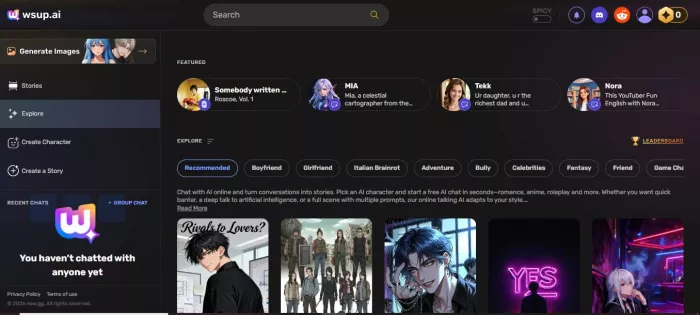
wsup.ai is a browser-based and mobile-friendly AI character chat platform where users can interact with fictional personalities. These characters can represent anime figures, fantasy heroes, romantic companions, or entirely original creations.
Unlike standard AI chatbots that focus on answering questions, wsup.ai is designed for emotional and imaginative engagement. The platform aims to create conversations that feel continuous, expressive, and tailored to each character’s personality.
Users can begin chatting almost instantly, without mandatory registration, making the experience accessible to anyone curious about AI companionship.
wsup.ai presents itself as a platform that goes beyond traditional chatbot interactions by offering immersive AI character conversations. On its website and promotional material, the platform makes several notable claims about what it can deliver:
1. Lifelike AI Personalities
wsup.ai suggests that its characters exhibit distinctive personalities, expressive tones, and engaging conversational styles, almost like talking to a fictional but believable persona.
2. Long-Term Memory in Conversations
One of the platform’s appealing promises is that it can remember details from earlier in a chat session making dialogue feel smoother and more consistent over time.
3. Emotional Responsiveness
Some marketing descriptions hint that characters can respond with emotional nuance, reacting differently based on context, tone, or user input.
4. Customizable Characters
wsup.ai allows users to create or modify AI characters by defining traits, personalities, moods, and even specific conversational behaviors.
5. Narrative and Story-Driven Interaction
Instead of generic Q&A responses, the platform aims to facilitate interactions that feel like storytelling or roleplay, with characters staying “in-role.”
While wsup.ai does deliver an enjoyable and distinctive experience compared with basic question-answer chatbots, it’s important to set realistic expectations:
● Personality Depth: Yes, many characters do exhibit a sense of individuality. They speak in a consistent style and can make conversations feel more alive than generic bots. However, this “personality” is still generated by patterns in text, not genuine emotion or understanding.
● Memory of Conversations: The platform retains short-term context during a session, which helps conversations feel coherent. But it does not truly remember past sessions permanently in the way humans remember. So long-term memory claims should be understood as session continuity rather than durable recollection.
● Emotional Responses: Characters can appear emotionally expressive; they use language that feels responsive. However, this is a simulation of emotion based on training data, not authentic feelings. So while the experience can feel emotionally engaging, it is not emotional intelligence in the human sense.
● Customization: This is one of wsup.ai’s stronger offerings. Allowing users to shape character traits, moods, and response styles genuinely enhances personalization and creativity.
● Story-Driven Interaction: The platform performs reasonably well here. Conversations often feel more narrative and immersive compared with simple question-answer exchanges, especially when users are willing to roleplay or guide the dialogue.
At the heart of wsup.ai is its character chat system. Instead of speaking to one general AI, users choose from a collection of personalities. Each character is designed with a backstory, tone, and emotional style, allowing conversations to feel more unique and expressive.
Another key feature is character customization. Users can create their own AI personas by defining traits such as mood, speaking style, and interests. This makes the platform especially appealing to writers and roleplay enthusiasts who want full creative control.
The platform also supports continuous conversations. While the AI does not truly “remember” like a human, it maintains short-term context, giving chats a sense of continuity. Some versions also experiment with storytelling tools and image generation, though these features may vary in performance.
Using wsup.ai is intuitive and doesn’t require any technical knowledge. Whether you’re a first-time visitor or someone familiar with AI chat tools, the following steps will help you navigate the platform smoothly.
Step 1: Open wsup.ai in Your Browser
Begin by visiting the official website at https://wsup.ai using any modern web browser (Chrome, Firefox, Safari, etc.). You do not need to download an app or install software; everything works directly in your browser.
When the site loads, you’ll see a welcoming interface with options to browse, select, or create characters.
Step 2: Browse or Select a Character
The first and most exciting choice you’ll make on wsup.ai is selecting an AI character to chat with.
On the homepage or main screen, you’ll find:
● Predefined characters with different personalities, styles, and themes
● Categories such as anime, fantasy, romantic, storytelling, or creative companions
Take your time to scroll through the options. Each character usually has a brief description that hints at their personality and conversational style.
Once you find one that interests you, tap or click on that character to start.
Step 3: Start the Conversation
After selecting a character, a chat window appears.
Here’s what you do next:
1. Click into the text input box at the bottom of the chat window.
2. Type your first message; it can be a simple greeting, a question, or anything you’d like to talk about.
3. Hit Enter (or tap the send button).
Within moments, the character will respond in a way that reflects its unique personality and style.
The conversation continues just like texting with a friend except your companion is an AI.
Step 4: Guide the Dialogue
Once the chat begins, you have full control over the direction of the conversation. You can:
● Ask questions
● Explore personality traits
● Tell the character about yourself
● Create a collaborative story together
The more specific and engaging your input is, the more interesting the responses tend to be.
Remember, the AI doesn’t actually understand emotions the way humans do; its responses are generated based on patterns in language but this often creates the impression of personality and emotional engagement.
Step 5: Create or Customize a Character (Optional)
If you want something even more personal than the preset characters, wsup.ai allows you to create or customize your own AI companion.
Here’s how:
1. Look for a “Create” or “New Character” option on the website (usually found near the character list).
2. Enter a name for your character.
3. Provide a description that details their personality, background, tone, and behavior. For instance:
“A witty, sarcastic storyteller who loves fantasy lore and always replies with humor.”
4. Choose any traits or characteristics the interface allows.
5. Save your character.
Once finished, your custom creation appears in your character list ready to chat.
This step lets you mold how the AI responds, giving you more creative control over interactions.
Step 6: Explore Additional Features
Depending on the version of wsup.ai you’re using, you may also have access to bonus features such as:
● Chat memory recall (session context for continuous dialogue)
● Story generation tools
● Image generation or character art
● Voice chat (if supported)
These features are optional and designed to make your experience more immersive.
Step 7: Ending or Saving Your Chat
When your session feels complete:
● Simply close the tab or navigate away.
● Some versions of wsup.ai may allow you to save chat history or continue later, but this varies with updates and platform versions.
If saving conversations is important to you, check the interface for a “Save” or “Export” option before exiting.
● Be clear and expressive in your questions. The AI responds better to rich prompts.
● Stay creative wsup.ai is strongest when used for roleplay or storytelling.
● Respect privacy and avoid entering sensitive personal information.
● Exploring multiple characters' different personalities yields very different conversations.
One of the first things people notice about wsup.ai is how immediately accessible and perceptually simple the platform feels. Right from the moment the homepage loads, the interface invites exploration; you don’t need to register, fill out forms, or install an app just to start chatting. This minimal barrier to entry is a design choice that many reviewers highlight as one of the platform’s strongest points. (GeniusFirms)
Clean, Visual, and Intuitive Design
wsup.ai uses a card-based layout for browsing characters. Each character is presented with a portrait, a short personality description, and simple tags indicating traits or themes (like romantic, funny, calm, or chaotic). This visual browsing experience feels familiar and light, very similar to social media feeds or matchmaking apps and helps users quickly decide who they want to talk to. (Bluestacks)
This approach does two things well:
● First, it reduces confusion for first-time users because the visuals and short descriptions clearly show what to expect before you enter the chat.
● Second, it creates an atmosphere that feels social and exploratory rather than technical or intimidating.
Instant Chat Without Friction
Perhaps the most striking aspect of the interface is its speed and directness. There’s no waiting in a long queue or stepping through the onboarding screen; you simply click a character and the chat opens. Many users appreciate this immediacy, especially compared with other AI chat platforms that require email sign-ups or registrations.
This “open door” feel contributes significantly to the overall user experience:
● Chats load instantly, even on mobile browsers.
● The control buttons are straightforward, nothing fancy or distracting.
● If there’s good network speed, the service feels snappy and responsive.
Conversations Feel Familiar, Not Cluttered
Inside the chat itself, the interface is kept simple yet functional. The text box is easy to find, the responses appear in a clean scrollable feed, and prompts feel familiar to anyone who has used messenger apps before. This minimalism is intentional the platform’s design focuses attention on the conversation, not on menus or complex UI elements.
Some users also report helpful UI elements like:
● Active chat lists on one side
● Character profile cards shown alongside ongoing conversations
These visual cues help users keep track of who they are talking to and make switching between multiple chats stress-free.
Cross-Device Compatibility
wsup.ai’s interface works almost identically in both desktop and mobile browsers. Because it runs entirely online with responsive design, users can switch between devices without confusion. This flexibility is often highlighted in app store descriptions and independent reviews.
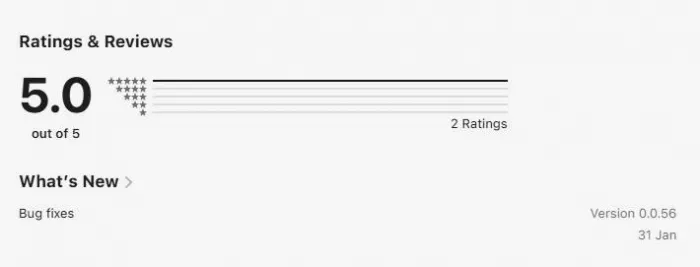
No interface is perfect, and wsup.ai’s simplicity can sometimes feel like a double-edged sword:
● Limited Depth in Complex Chats: Some users mention that after a long conversation, the AI may “reset context” or lose continuity, making the experience feel less immersive, a factor influenced partly by UI but also by model design.
● Image & Voice Features Are Less Polished: Extras like image generation and voice responses often feel inconsistent or buggy, which dims the shine of what otherwise feels like a smooth experience.
● Moderation Tools Are Basic: Unlike larger chat platforms that hide or filter content aggressively, wsup.ai’s interface gives broader freedom which some users enjoy, but others find risky or unrefined.
Community discussion threads and reviews indicate that many users find the design refreshing and easy to use for short, casual chats. They describe it as a fun and fast place to experiment with different characters rather than a destination for long, continuous engagement. (Reddit)
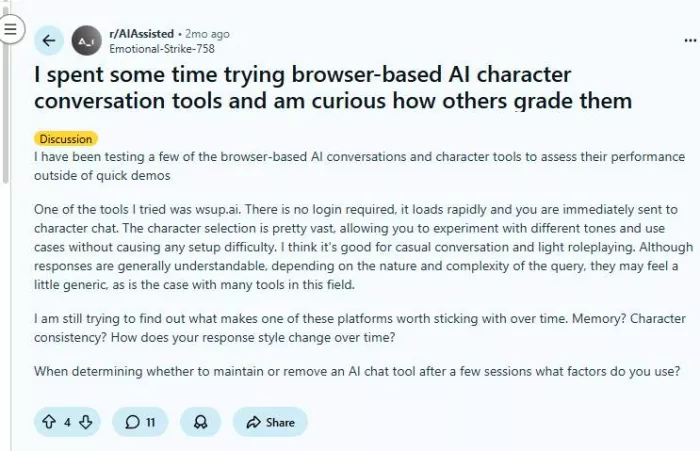
However, others caution that while the UI is easy to navigate, long-term engagement and advanced features currently feel less polished compared with competing interfaces.
Summary: What the User Experience Really Feels Like
wsup.ai’s interface is built around accessibility and simplicity. It makes starting a conversation with AI characters as effortless as opening a social feed. The visual character cards, instant chats, and responsive design make it approachable for users of all ages and tech skills. However, the trade-off is that depth, consistency, and advanced media features still lag behind the polish seen in larger AI platforms. The overall experience feels fun, creative, and low-pressure ideal for casual exploration, but not yet ready to replace more sophisticated chat environments.
When evaluating any AI chat platform, especially one centered around conversations and user-generated content, safety and privacy are often at the top of people’s minds. With wsup.ai, there’s no one-size-fits-all answer — but we can break down what’s known, what’s unclear, and what you should pay attention to.
Is wsup.ai Legit and Secure?
From a technical standpoint, wsup.ai generally appears to be a legitimate website rather than a scam. Independent trust evaluators such as ScamAdviser report that the site has a valid SSL certificate, no major malware or phishing alerts, and isn’t blacklisted by security engines. This suggests that basic safety protections (like secure browsing over HTTPS) are in place.
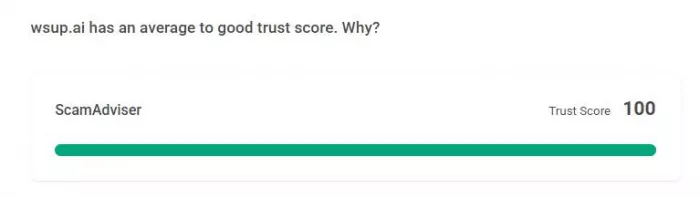
That said, technical trust scores vary depending on the evaluator:
Some tools rate wsup.ai highly, indicating good safety signals, while others give a more cautious score due to its newness online or limited historical data.

Bottom line: The platform does not currently show clear signs of being unsafe or fraudulent, but it is relatively new and less established than major players like Character.AI or Replika.
What Kind of Data Does wsup.ai Collect?
On the official app listing pages (like Apple’s App Store), the platform indicates that certain user data may be collected and linked to your device or identity, including:
● Contact information
● User-generated content (your chats)
● Identifiers and usage data
● Diagnostics data
● Some non-linked data like location metadata
This type of data collection is not unusual for chat platforms, but it does mean wsup.ai could be storing or analyzing your interactions.
Important to highlight: the web version doesn’t require a login or account creation, which means in many cases there’s no username or email attached to your chats unless you personally provide it.
What’s Not Clearly Explained Publicly
Unlike some major social or AI platforms with detailed and well-structured privacy policies, wsup.ai’s data retention, deletion, and long-term storage practices are not clearly documented in a user-friendly way on the public site or app pages.
For example:
● How long are chat transcripts stored?
● Are deleted messages truly removed from servers?
● Does wsup.ai use chat data to train future AI responses?
These questions are not answered transparently, which is a privacy concern that users should be aware of.
Content Moderation and Safety Controls
Because wsup.ai lets users explore many kinds of AI characters and conversations, moderation plays a role in protecting users from inappropriate content. However:
● Independent user feedback indicates that moderation tools are lighter than on large mainstream platforms.
● Some users report encountering unmoderated or unexpected character behaviors if you enter suggestive or edge-case prompts.
This means that while content isn’t likely to be harmful by default, you may encounter outputs that feel off-brand or unsafe, especially if you push the boundaries of expected inputs.
Is It Safe for Everyone?
Given the information available:
Generally safe for casual, short-term, and creative use.
You can enjoy fun or imaginative conversations without giving up personal credentials.
Not advised for anything involving sensitive personal info.
Because storage and retention policies aren’t transparent, avoid sharing details like your full name, address, financial information, health issues, or other private content.
Not ideal for minors without supervision.
Since moderation is not as strict as major social platforms, children and teenagers may encounter unfiltered language or themes that aren’t age-appropriate.
Here are good safety habits for anyone using wsup.ai or similar chat platforms:
1. Avoid Personal Data
Don’t share private information like your address, phone number, banking details, passwords, or other sensitive content in any chats.
2. Assume Chats Are Stored Somewhere
Even if the interface doesn’t make chat history obvious, assume the backend stores data at least temporarily and act accordingly.
3. Be Cautious With Emotional Content
AI characters can appear emotional or engaging, but remember this is an illusion created by text patterns not genuine understanding.
4. Treat Moderation as Minimal
Expect that not all content will be filtered or controlled. If you encounter inappropriate language or scenarios, stop the session.
5. Check Updated Policies
If privacy is important to you, revisit wsup.ai’s own terms of service and privacy policy periodically, as these can change over time.
In simple terms:
wsup.ai is broadly safe for exploratory, casual use, especially when used in ways that don’t involve personal or sensitive topics. It doesn’t exhibit major red flags like malware, phishing reports, or scam signals.
However, privacy transparency is limited, especially regarding how long chat transcripts persist and whether they’re used for analytics or training. Users wary of data collection should take this into account before engaging deeply with the platform.
| Pros | Why This Matters | Cons | Why This Matters |
| Instant access without signup | Users can start chatting immediately without sharing emails or personal details | Privacy policy lacks transparency | Users don’t clearly know how long chats are stored or how data is used |
| Character-driven interface | Makes browsing fun and visually appealing | Limited content moderation | Risk of encountering inappropriate or unfiltered responses |
| Custom AI character creation | Allows deep personalization and creativity | Weak long-term memory | AI may forget previous conversations across sessions |
| Free to use | No financial barrier for new users | Advanced features feel inconsistent | Extras like images or voice may not always work smoothly |
| Mobile & desktop friendly | Smooth experience across devices | New and less established | Fewer trust signals compared to major platforms |
| Fast response speed | Conversations feel fluid and engaging | Not suitable for sensitive topics | Should not be used for therapy, financial, or personal data sharing |
| Encourages storytelling & roleplay | Ideal for writers and creative users | Emotional illusion risk | Some users may form unhealthy emotional attachment |
wsup.ai is ideal for people who enjoy imaginative storytelling, anime-style characters, and roleplay conversations. Writers can use it for brainstorming dialogue, while casual users may enjoy it as a fun and creative outlet.
However, it may not be suitable for those who prioritize data security, emotional dependency risks, or professional use.
Is wsup.ai free to use?
Yes, basic features are available without payment, although premium tools may be added later.
Is wsup.ai safe?
It is generally safe for casual use, but users should avoid sharing personal data.
Can I create my own AI character?
Yes, character creation is one of its strongest features.
Does wsup.ai store conversations?
Short-term memory is used for context, but long-term storage policies are unclear.
Is wsup.ai suitable for children?
Due to limited moderation, parental guidance is recommended.
wsup.ai is a creative and engaging platform for anyone curious about AI character interaction. While it cannot replace real emotional connections, it offers a playful space for storytelling, imagination, and light companionship.
Its simplicity and creative focus make it enjoyable, but users should approach it with realistic expectations and basic privacy awareness. For entertainment and roleplay, wsup.ai is certainly worth exploring.
Anthropic is tightening how its AI coding platform is billed, confirmi...

AI website builders have shifted from simple template tools to systems...

April 4, 2026Elon Musk has asked banks involved in SpaceX’s anticipate...

When dashboards exist but decisions still stallA mid-sized ecommerce c...

Alternatives Based on What You Want to FixIf You Want Better Pipeline...
Canberra, April 1, 2026- The Australian government has entered into a...

Discussion