One tool gaining attention among programmers is Blackbox AI. Rather than acting purely as an autocomplete engine, Blackbox AI focuses on helping developers discover, generate, and understand code from multiple sources.
The platform operates as a coding assistant that can generate code snippets, explain unfamiliar functions, search code repositories, and integrate with development environments through browser extensions and editors. Instead of replacing programmers, the system works more like a research assistant that accelerates the process of writing and understanding software.
The impact of these tools becomes clearer when examining how developers actually use them in day-to-day work.

At its core, Blackbox AI attempts to solve one of the most time consuming parts of programming: finding working code examples and understanding how they work.
Developers constantly search for solutions across platforms such as GitHub repositories, documentation sites, and programming forums. Blackbox AI aggregates many of these patterns into an AI powered search and generation engine.
The platform typically performs several functions:
● generating code snippets from natural language prompts
● explaining sections of unfamiliar code
● searching existing repositories for similar code
● helping convert logic ideas into working implementations
Instead of writing every line manually, a developer can describe a problem and let the AI suggest an implementation.
| Capability | Blackbox AI Performance | Practical Impact |
| Code generation | Strong | Quickly produces basic functions and scripts |
| Code explanation | Strong | Helps developers understand unfamiliar code |
| Repository search | Moderate to strong | Useful for exploring open source code |
| Multi language support | Good | Supports common languages like Python, JavaScript, Java |
| IDE integration | Moderate | Browser extension and editor support available |
This table highlights an important characteristic of the tool. Its strongest area is not only generating code but helping developers interpret and reuse existing code. That capability can significantly reduce the time spent reading unfamiliar codebases.
To understand the real value of Blackbox AI, it helps to imagine a common programming scenario.
Suppose a developer is building a small web application and needs a function that sorts a list of user objects by registration date.
Normally the developer might search the internet, browse documentation, and then write the function manually.
With an AI coding assistant, the workflow changes slightly.
The developer writes a prompt such as:
“Create a Python function that sorts a list of user objects by registration date.”
The AI then generates a code snippet.
Example Generated Function-
def sort_users_by_date(users):
return sorted(users, key=lambda user: user["registration_date"])
The developer reviews the output, adjusts it if necessary, and integrates it into the project.
This process usually takes seconds rather than minutes or hours.
However, the generated code should still be reviewed carefully. AI systems sometimes produce code that appears correct but contains logical mistakes or inefficiencies.
The tool is therefore best used as a starting point rather than a final solution.

Blackbox AI operates in a competitive space where several AI coding assistants already exist.
| Tool | Main Focus | Best For |
| Blackbox AI | Code search and generation | Exploring and understanding code |
| GitHub Copilot | AI autocomplete inside IDE | Writing code faster inside editors |
| Tabnine | Predictive code suggestions | Enterprise development teams |
| Codeium | Free code generation and autocomplete | Individual developers |
This comparison shows that Blackbox AI occupies a slightly different niche.
GitHub Copilot focuses heavily on autocomplete suggestions while coding.
Tabnine emphasizes enterprise level code prediction.
Codeium offers a free alternative focused on coding assistance.
Blackbox AI places more emphasis on code discovery and explanation, which can be valuable when working with unfamiliar repositories.
Blackbox AI is available through several access points including web interfaces and browser extensions.
Many developers first encounter the platform through its browser plugin, which allows users to capture code snippets from videos, tutorials, or web pages and convert them into usable code.
| Access Method | Availability | Typical Use |
| Web interface | Free access available | Generating and searching code |
| Browser extension | Available | Capturing and understanding code snippets |
| IDE integrations | Limited | Assistance while coding |
| Premium features | Subscription based | Advanced usage and extended limits |
The free tier generally provides enough functionality for casual experimentation.
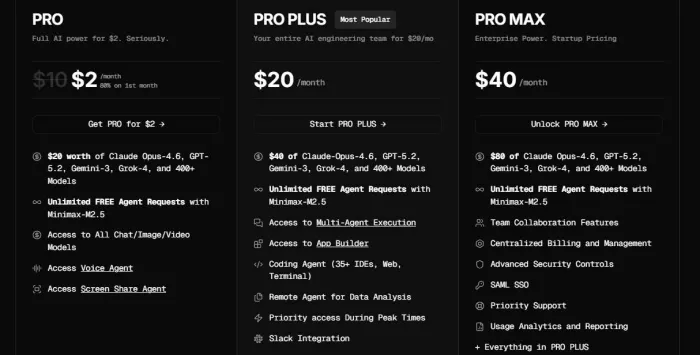
Premium plans expand generation limits and improve performance for frequent users.
Compared with some enterprise AI coding tools, the pricing barrier is relatively low, which makes the platform accessible to individual developers and students.
When developers discuss AI coding assistants, several patterns emerge in user feedback.
The most common benefit is speed. Tasks that previously required multiple searches can now be handled through a single prompt.
Another advantage is the ability to understand unfamiliar code quickly. Developers frequently encounter legacy systems or open source repositories with minimal documentation. Tools that explain code can reduce the time needed to understand these projects.
Blackbox AI also benefits from its repository search capability. This feature allows users to explore real world implementations of programming patterns rather than relying only on theoretical examples.
These advantages are particularly helpful for beginner developers who may struggle to translate programming concepts into working code.
Despite its advantages, AI coding assistants are not perfect.
One limitation is that generated code sometimes contains logical errors or outdated practices. Developers still need to test and review all output carefully.
Another challenge is context awareness. AI models do not always understand the full structure of a complex project. As a result, generated code may not integrate seamlessly with existing architecture.
There are also performance concerns in highly specialized domains such as embedded systems or advanced algorithms. In these areas, human expertise remains essential.
In practice, the tool functions best as a productivity assistant rather than a replacement for programming knowledge.
To better understand how developers perceive the tool, it is useful to examine several performance metrics.
| Metric | Score (Out of 10) |
| Ease of Use | 8 |
| Code Quality | 7 |
| Generation Speed | 8 |
| Usefulness for Beginners | 9 |
| Integration Flexibility | 6 |
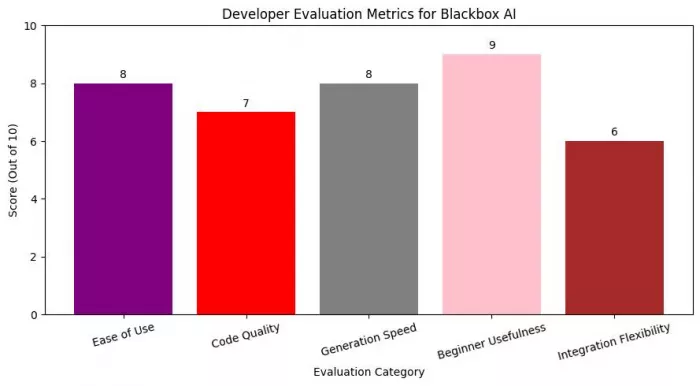
The data suggests that the platform performs particularly well for beginner developers. Its ability to explain code and provide working examples lowers the barrier to entry for programming.
Integration flexibility receives a lower score because the tool does not yet offer the same level of IDE integration as some competing assistants.
Code quality generally receives positive ratings but still requires manual verification.
Tools like Blackbox AI are most useful when developers are navigating unfamiliar territory. A programmer who already knows how to implement a specific algorithm rarely needs assistance writing the code. The real productivity gain appears when the developer encounters something new, such as an unfamiliar library, an undocumented codebase, or a programming language they have not used recently.
In those situations, the biggest obstacle is not typing code but understanding how existing systems work. Developers may spend significant time reading documentation, searching for working examples, or scanning open source repositories to understand how a feature should be implemented.
Blackbox AI reduces that friction by acting as a search layer over programming knowledge. Instead of manually exploring dozens of sources, a developer can request examples, explanations, or implementations directly through the interface.
This approach does not eliminate traditional research, but it compresses the discovery process. The developer still reviews the code, evaluates the logic, and adapts it to the project. The difference is that the first working version often appears much faster.
The platform is particularly helpful for three common scenarios:
● exploring unfamiliar open source repositories
● understanding code written by other developers
● generating small functional building blocks during development
In these cases, the tool behaves less like an automated programmer and more like an intelligent code reference system.
However, the limitations remain important. Generated code still requires validation, testing, and optimization. Experienced developers quickly learn that AI output should be treated as a draft rather than production ready software.
For teams working on complex systems, the real advantage of AI assistants is not full automation but faster iteration. Developers can test ideas quickly, evaluate alternative implementations, and explore new frameworks without spending hours searching for basic examples.
In that sense, Blackbox AI reflects a broader shift in software development tools. Programming is gradually becoming less about memorizing syntax and more about navigating information efficiently. AI assistants are beginning to function as interactive knowledge layers that sit between developers and the vast amount of code already available online.
For developers who know how to question, verify, and refine AI generated output, tools like Blackbox AI can significantly shorten the path between an idea and a working implementation.

The First Few Minutes on the Site Tell You a LotWhen I first landed on...

Fraud has evolved alongside technology. What was once limited to paper...
SoftBank Group has secured a $40 billion loan from a consortium o...
Recent advances in neural networks and large language models have sign...

There is a quiet shift happening inside AI chat platforms, and it has...

Meta Platforms has significantly increased its investment in a West Te...

Discussion