AutoDraft AI sits inside this emerging category of AI-assisted storytelling tools. The platform focuses specifically on helping creators generate animated content, comics, and story-driven visuals without requiring advanced animation skills.
The platform has attracted interest from several creator groups including YouTubers producing animated storytelling videos, comic artists experimenting with AI-assisted panels, and educational creators who need visual narratives without large production budgets.
AutoDraft positions itself as an AI animation and storytelling platform rather than a pure image generator. Its system combines several AI modules that work together to create a pipeline from concept to finished visual content.
The platform typically revolves around three core building blocks:
1. Character generation systems
2. Scene and environment creation
3. Animation and voice integration
Instead of asking users to manage multiple tools separately, AutoDraft attempts to place these capabilities inside one workflow.
The design philosophy behind the platform can be summarized as creator acceleration rather than creator replacement. The goal is to reduce the technical barrier to animation while still allowing creators to guide the narrative direction.
The types of creators the platform targets include:
| Creator Type | Typical Use |
| YouTube storytellers | Animated story channels |
| Comic artists | Rapid comic panel creation |
| Educational creators | Explainer animations |
| Indie storytellers | Character-driven narratives |
| Social media creators | Short animated clips |
The ecosystem is therefore focused on visual storytelling rather than productivity tasks.
The most important question with any AI creative tool is how it fits into a real production pipeline. AutoDraft’s workflow is designed to move from a simple idea to a structured animation or comic sequence.
The typical process follows several steps.
Step 1. Sign up or Log in
First, go to the AutoDraft website and click Sign Up in the top right corner.
You can create an account using:
After logging in, you will be redirected to the AutoDraft dashboard.
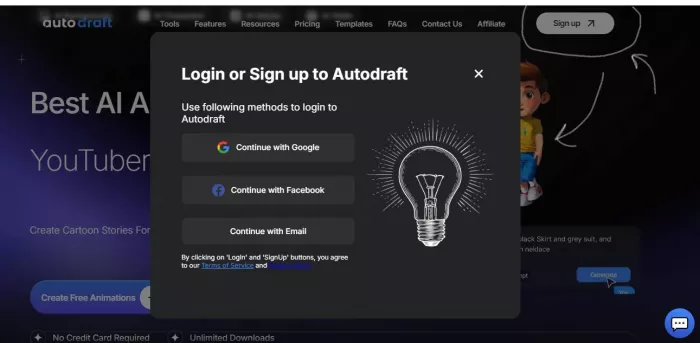
Step 2. Open Animation Studio
Once you reach the dashboard, you will see several AI tools.
Click Animation Studio.
This tool is used to create animated scenes and visual stories
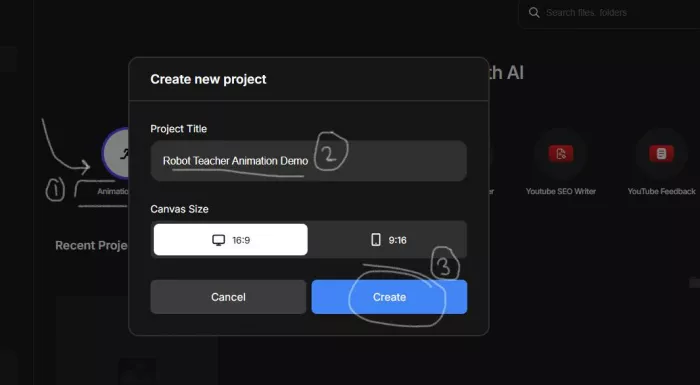
Step 3. Create a New Project
After clicking Animation Studio, a Create New Project window will appear.
Fill in the details:
Project Title
Example: Robot Teacher Animation Demo
Canvas Size
Choose 16:9 for YouTube style animation.
Then click Create.
This opens the animation editor.
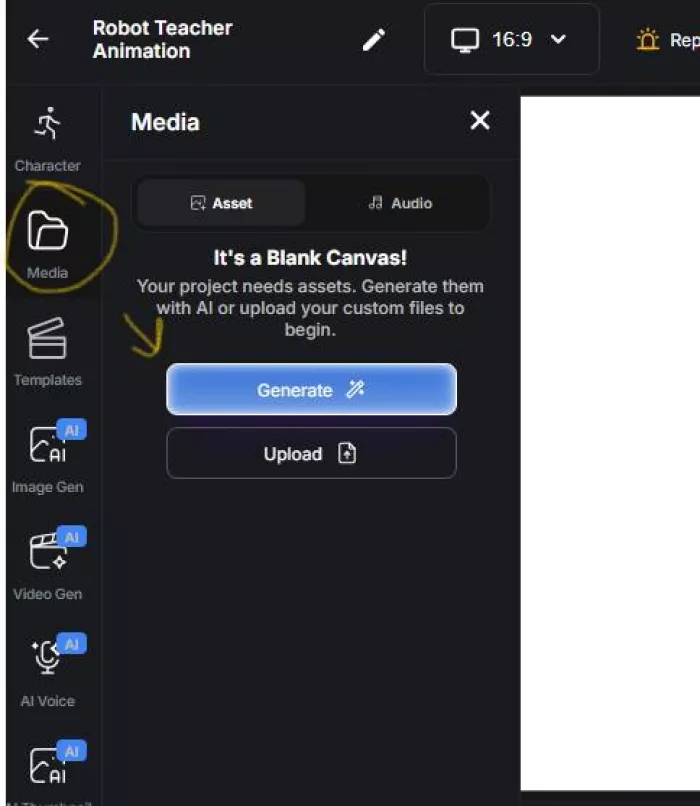
Step 4. Open the Media Panel
Now the animation editor opens with a blank canvas.
On the left sidebar click: Media
This is where you add assets like characters, backgrounds, or images.
Because the canvas is empty, the platform asks you to generate assets first.
Click Generate.
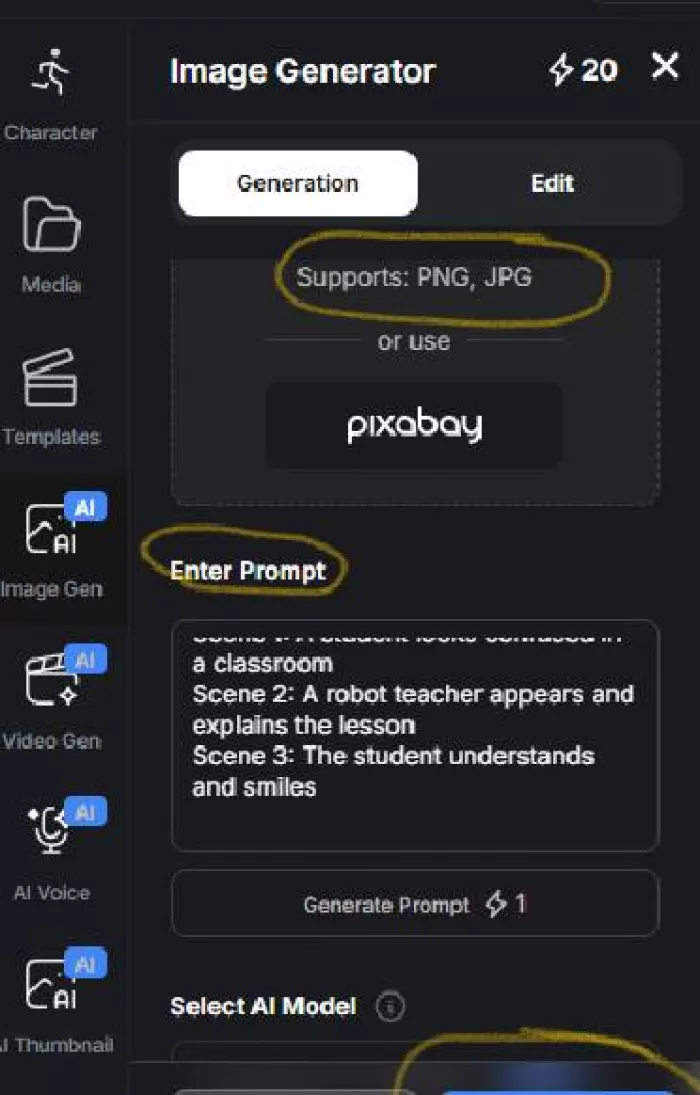
Step 5. Open the Image Generator
Clicking Generate opens the Image Generator tool.
Here you can create characters, scenes, or objects using prompts.
Look for the Enter Prompt box.
This is where you describe the scene you want to generate.
Example prompt used:
Scene 1: A student looks confused in a classroom
Scene 2: A robot teacher appears and explains the lesson
Scene 3: The student understands and smiles
After entering the prompt, click Generate.
This uses credits to generate the image.
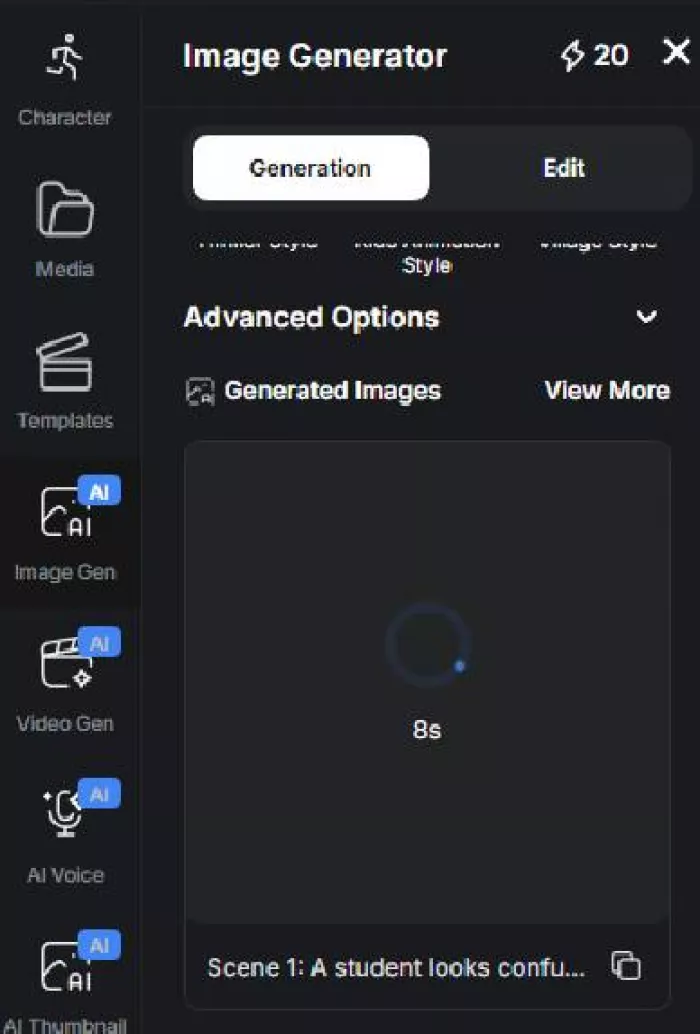
Step 6. Wait for the AI to Generate the Scene
After clicking generate, AutoDraft processes the request.
You will see a loading animation.
The AI creates the scene based on your prompt.
Step 7. View the Generated Scene
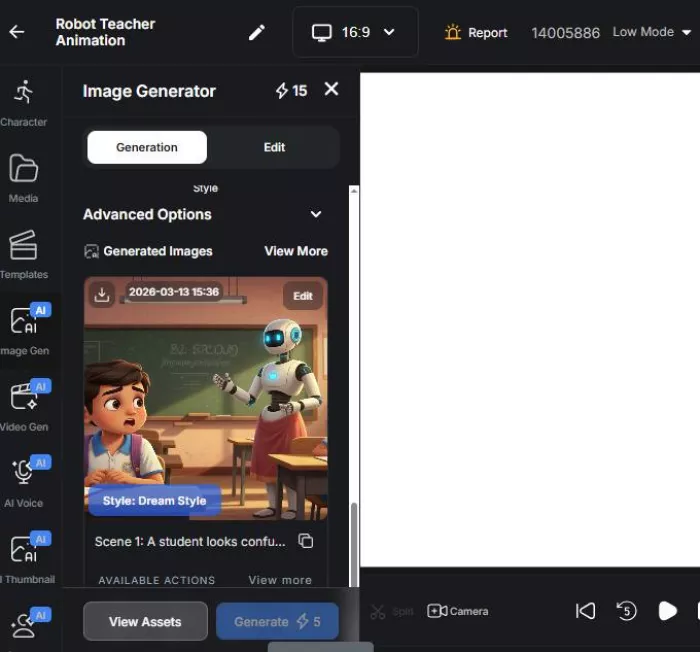
Once generation finishes, the AI output appears in the Generated Images section.
In your case the generated scene shows:
● A robot teacher
● A student
● A classroom background
You can now use this scene as part of your animation.
Step 8: Add the Generated Scene and Apply Animation
Once the AI finishes generating the image, select the scene from the Generated Images section and add it to the canvas. After placing it on the canvas, use the timeline and animation controls at the bottom of the editor to adjust the scene duration, camera movement, or basic motion effects. This step turns the static image into a simple animated scene.
Step 9: Add Voice and Export the Animation
Next, open the AI Voice option from the left sidebar and enter a short dialogue or narration for the scene. Generate the voice and attach it to the timeline so it plays during the animation. After previewing the scene using the play button, click Download at the top right to export the final animated video.
AutoDraft combines multiple creative modules inside one interface.
The platform attempts to solve two main problems in AI storytelling:
1. Character consistency across scenes
2. Rapid animation creation from static visuals
| Feature | Function | Practical Benefit |
| Character generation | Create unique AI characters | Consistent visual identity |
| Character memory | Maintain character look across scenes | Story continuity |
| Scene generation | Produce environments and backgrounds | Faster visual production |
| Animation tools | Add movement to characters | Basic animation without manual work |
| Voice generation | AI voiceovers for dialogue | No external recording required |
| Editing tools | Adjust scenes and frames | Creative control |
| Background generator | Create environments quickly | Faster world building |
| Export options | Download animations or images | Flexible content usage |
These features combine to create a visual production pipeline inside a single tool.
Different types of creators approach AutoDraft in different ways.
| Creator Type | Project Type | How AutoDraft Helps |
| YouTube creators | Animated storytelling videos | Speeds up visual production |
| Comic artists | Webcomics or graphic stories | Generates consistent panels |
| Educators | Animated explainer videos | Visualizes lessons quickly |
| Social media creators | Short animated content | Fast production for posts |
| Indie storytellers | Character-driven narratives | Enables low budget animation |
For example, YouTube channels that rely on storytelling formats often need dozens of scenes for a single video. Producing these visuals manually could take days. AI generation reduces this process to hours.
Several characteristics explain why tools like AutoDraft are attracting attention from creators.
Production Speed
Traditional animation workflows involve drawing frames, rigging characters, and editing motion sequences. AI animation platforms dramatically shorten these steps.
A small creator can generate scenes and basic animation within minutes.
Accessibility for Beginners
Most animation software requires specialized knowledge. AutoDraft allows creators with little technical background to generate visual content using prompts and guided tools.
Visual Consistency
Maintaining consistent characters across scenes is a significant challenge in generative AI. The platform’s character memory system helps reduce this issue.
Lower Production Costs
Hiring illustrators or animators for large projects can be expensive. AI-assisted production can significantly reduce those costs for small creators.
Despite its advantages, AutoDraft is not a perfect solution.
Credit Consumption
The platform uses a credit system where different operations consume credits. Complex scenes or animations may require more credits than simple images.
This means production costs depend on usage patterns.
Style Limitations
Although the system can generate multiple art styles, results may still be constrained by the training data and model capabilities.
Some creators report that specific styles are harder to reproduce consistently.
Prompt Dependency
The quality of the output depends heavily on prompt clarity. Beginners may need time to learn how to describe scenes effectively.
Limited Deep Editing
Compared with professional animation software, editing options remain relatively simple.
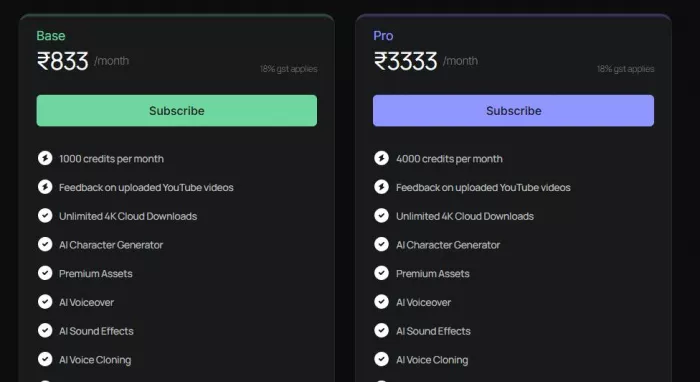
AutoDraft uses a credit system rather than unlimited generation.
| Plan | Monthly Price | Credits |
| Starter | $10–$12 | ~1000 credits |
| Creator | $35–$40 | ~4000 credits |
Credits are consumed depending on the action performed.
Example Credit Usage
| Task | Estimated Credit Use |
| Character generation | 10–20 credits |
| Scene creation | 20–40 credits |
| Animation rendering | 50–100 credits |
| Voice generation | 10–30 credits |
Monthly Usage Example
| Creator Type | Monthly Projects | Estimated Credit Use |
| YouTube storyteller | 5 animated videos | ~3000 credits |
| Comic artist | 40 panels | ~1500 credits |
| Social media creator | 20 short clips | ~2000 credits |
Understanding credit consumption helps creators estimate the real cost of production.
AutoDraft operates in a competitive ecosystem of AI visual tools.
| Tool | Main Purpose | Key Features | Ease of Use | Best For |
| AutoDraft AI | AI cartoon and story animation | AI characters, background generation, voiceover, animation editor, storytelling workflow | Beginner friendly | YouTube animated stories, explainer videos, short animations |
| Animaker AI | Drag-and-drop animation builder | Prebuilt characters, templates, voiceover tools, scene editor | Very easy | Marketing videos, explainer animations |
| Renderforest Animation Maker | Online animation and video creator | Templates, AI voiceover, scene builder, stock assets | Easy | Social media animations and business videos |
| Vyond AI | Character animation and business storytelling | Character builder, lip sync, animation scenes, script based videos | Moderate | Corporate training and explainer videos |
| CreateStudio | Desktop animation and cartoon maker | Character animation, scene builder, drag-and-drop editor | Moderate | Cartoon style marketing videos |
| Krikey AI | AI character animation generator | Motion animation, 3D avatars, animation presets | Moderate | Game developers and animated character creators |
Each tool focuses on a slightly different creative workflow.
AutoDraft emphasizes character-based storytelling rather than cinematic video generation.
AutoDraft AI represents an early stage of a broader transformation in digital storytelling.
Instead of requiring specialized animation skills, creators increasingly rely on AI systems that translate ideas into visuals.
The technology is still evolving, and limitations remain. But the direction is clear. AI tools are lowering the barrier to animation and enabling a wider range of creators to experiment with visual storytelling.
For creators who need to produce animated content quickly without large teams, platforms like AutoDraft offer a glimpse of how storytelling workflows may look in the coming years.
Artificial intelligence has rapidly moved beyond productivity tools an...

AI website builders have shifted from simple template tools to systems...
April 4, 2026Elon Musk has asked banks involved in SpaceX’s anticipate...
When dashboards exist but decisions still stallA mid-sized ecommerce c...

Alternatives Based on What You Want to FixIf You Want Better Pipeline...
Canberra, April 1, 2026- The Australian government has entered into a...

Discussion